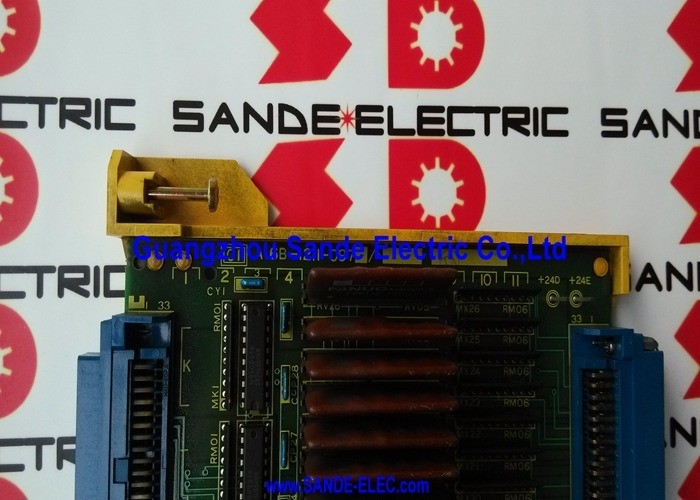
A16B-1211-0970 | FANUC Series 0-C Zero Control E3 I/O PCB — 104 DI / 72 DO / 0-MC / 0-TC / 0-MD / 0-TD
Zero Control E3 — The Most Complete I/O Board
The FANUC Series 0-C (Zero C, or F0C) I/O board family uses an E-designation to identify different I/O capacity levels within the A16B-1211-097x range:
| Part Number |
Designation |
DI |
DO |
| A16B-1211-0970 |
E3 |
104 |
72 |
| A16B-1211-0971 |
E2 |
Reduced |
Reduced |
| A16B-1211-0972 |
E1 |
Minimum |
Minimum |
The E3 designation — A16B-1211-0970 — is the fully-populated board. All 104 input channels and 72 output channels are assembled and active. The E2 and E1 variants carry progressively fewer circuits for simpler machine tools where fewer I/O points are needed.
For Series 0-C machining and turning centres with fully equipped operator panels, automatic tool changers, pallet systems, and hydraulic circuits, the E3 configuration provides the complete I/O count needed without running out of channels.
Key Specifications
| Parameter |
Value |
| Designation |
E3 (fully populated) |
| Digital Inputs |
104 |
| Digital Outputs |
72 |
| CNC System |
FANUC Series 0-C |
| Compatible |
0-MC, 0-TC, 0-MD, 0-TD |
| Revision |
/01A |
PMC Ladder Integration — How the E3 Board Functions
The A16B-1211-0970 connects to the Series 0-C CNC's PMC (Programmable Machine Controller) ladder logic. The ladder programme reads all 104 input states every scan cycle and writes to all 72 outputs.
The E3 board bridges:
- The machine tool's field wiring (switches, sensors, actuators)
- The CNC's PMC internal bus
When the A16B-1211-0970 fails, the PMC loses communication with the machine field devices. Machine sequences halt — the PMC cannot confirm interlocks are clear, cannot verify tool change completion, and cannot command machine actuators. The CNC typically generates I/O link alarms specific to the E3 board's address range.
Application Scenarios
0-MC machining centre I/O failure: A FANUC 0-MC machining centre develops random PMC alarms affecting tool changer and pallet functions. Main axis functions remain normal. The A16B-1211-0970 E3 board is identified as the fault source. Replacement restores full 104/72 I/O communication.
0-TC turning centre with complex automation: A 0-TC turning centre with bar feeder, hydraulic chuck, and tailstock uses 90 of the available 104 inputs and 65 of the 72 outputs. The E3 board's full capacity accommodates this signal load comfortably.
FAQ
Q1: What is the difference between the E3 (A16B-1211-0970) and the E2 (A16B-1211-0971)?
The E3 is the fully-populated board with 104 DI / 72 DO. The E2 (A16B-1211-0971) has fewer I/O circuits — a smaller DI/DO complement for simpler machine tools. The E3 and E2 serve the same physical slot in the Series 0-C CNC but cannot be interchanged without affecting I/O address availability. If a machine's PMC programme addresses inputs or outputs in the 73–104 DI or 57–72 DO range, those signals do not exist on an E2 replacement.
Q2: Does replacing the A16B-1211-0970 require PMC programme changes?
No. The PMC programme uses I/O addresses, not the hardware board's identity. Replacing the A16B-1211-0970 with an identical E3 board at the same address configuration restores full PMC I/O communication without any PMC programme modification. The existing ladder programme continues addressing the same 104/72 I/O points on the new board.
Q3: Are the E3 board's output circuits transistor or relay type?
Series 0-C I/O boards use transistor output circuits (sink type) — not mechanical relay contacts. Transistor outputs have no moving parts to wear out and can switch at higher cycle rates than relays. They are appropriate for controlling relay coils, indicator lamps, and solenoid valve coils — but require external relay contacts for switching mains-voltage loads. Verify the output type and load requirements from the machine's electrical documentation before connecting any output load.
Q4: What is the PMC alarm code range that points to the A16B-1211-0970?
The I/O alarms generated when the E3 board fails typically include PMC alarm codes related to the I/O link communication address range assigned to the board. Specific alarm codes are documented in the FANUC Series 0-C PMC maintenance manual and hardware connection manual. Alarms pointing to the specific I/O address block assigned to the E3 board's connector set (M186, M196, M201, M218, M220) in the CNC's I/O configuration narrow the fault to this board.


 Your message must be between 20-3,000 characters!