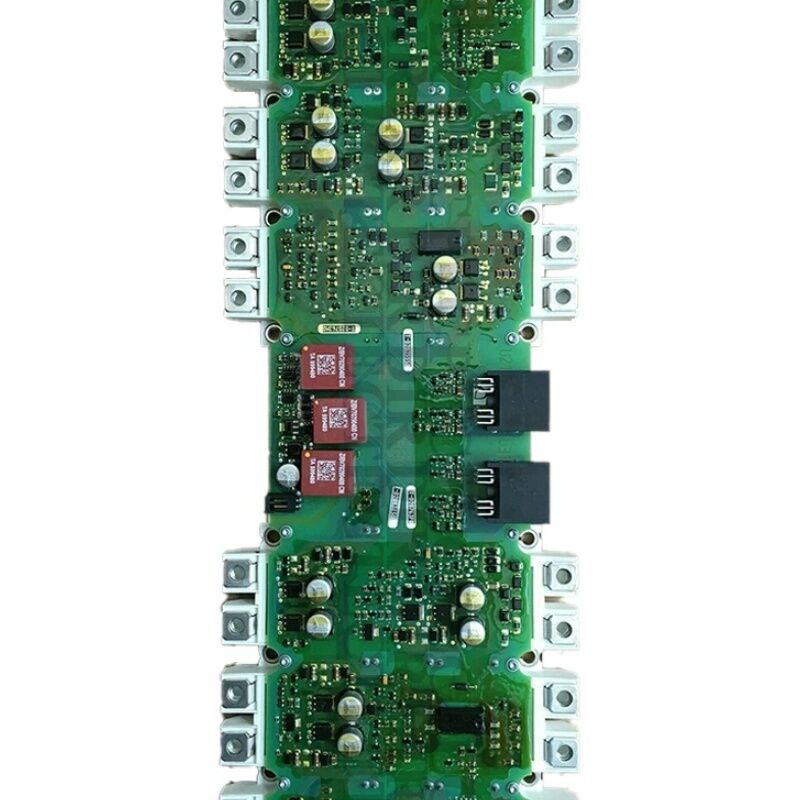
Siemens A5E00714560 | SINAMICS IGD2/R4 Drive Board — Power Block Repair for Chassis AC Drive Inverter Section
Part Number: A5E00714560
GWE Reference: GWE:A5E00714560
Manufacturer: Siemens AG — Gerätewerk Erlangen, Germany
Overview
The A5E00714560 is the first member of the A5E00714560 series — the IGD2/R4 SINAMICS power block family. It pairs the second-generation IGBT gate driver (IGD2) with a matched IGBT module in the R4 form factor, and serves as the inverter power section repair assembly for SINAMICS G120, G120C, and G150 chassis drives.
The series runs from A5E00714560 through A5E00714563, each covering a specific voltage and current combination within the SINAMICS chassis drive range. As the base member, the A5E00714560 is listed alongside its direct successor A5E36717797 in Siemens' spare parts cross-reference documentation. When the A5E00714560 is unavailable, A5E36717797 is the designated replacement — same function, updated gate driver hardware.
The IGD2 board handles three concurrent functions: converting the Control Unit's PWM commands into IGBT gate pulses, conditioning motor phase current measurements for the vector control algorithm, and implementing hardware desaturation protection that responds in microseconds to suppress faulty switching events.
Key Specifications
| Parameter |
Value |
| Part Number |
A5E00714560 |
| GWE Reference |
GWE:A5E00714560 |
| Manufacturer |
Siemens AG |
| Product Type |
IGD2/R4 Power Block Repair (Gate Driver + IGBT) |
| Drive Platform |
SINAMICS G120, G120C, G150 |
| Form Factor |
R4 |
| Gate Driver |
IGD2 second generation |
| Production Status |
Discontinued |
| Successor |
A5E36717797 |
| Country of Origin |
Germany |
A5E00714560 Series — Board Family Context
The A5E00714560-series boards are all IGD2/R4 assemblies sharing the same physical R4 form factor and the same IGD2 gate driver architecture. Each part number addresses a specific power rating within the SINAMICS chassis drive lineup. Consecutive numbers in the series — A5E00714560, A5E00714561, A5E00714562, A5E00714563 — cover different voltage and current combinations. They are not interchangeable; always confirm the specific A5E number from the installed board's label before ordering.
The IGD2 gate driver communicates with the SINAMICS Control Unit via fibre-optic links, providing galvanic isolation between the high-voltage power section and the low-voltage control electronics. This isolation protects the CU from the DC bus switching transients and allows safe diagnostic access to the drive's control functions while the power section operates.
Thermal Interface and Installation Note
Like all IGD2/R4 power block assemblies, the A5E00714560 must be installed on the drive heatsink with correct thermal interface material (TIM) between the IGBT module base plate and the heatsink surface. Omitting TIM raises the thermal resistance at the IGBT-heatsink junction and causes premature overtemperature faults even when the heatsink itself remains cool. Apply TIM per Siemens' specified procedure before securing the assembly.
FAQ
Q1: The drive shows F30021 or F30022 with no motor connected. Could the A5E00714560 be at fault?
Yes. F30021 (overcurrent) and F30022 (ground fault) with no motor connected can both originate from a failed current measurement circuit on the IGD2 board — the board's sensors produce an apparent current reading even with no load. Verify by checking whether the drive's phase current displays show a non-zero value at standstill. A non-zero reading confirms a measurement circuit fault on the A5E00714560.
Q2: The successor A5E36717797 is available. Can it directly replace the A5E00714560?
The A5E36717797 is the Siemens-designated successor for the same drive applications. Physical mounting, DC bus connections, and fibre-optic interfaces are compatible. Confirm the drive's firmware version supports the newer-generation IGD2 board's electronic identification before installation — early production SINAMICS units occasionally require a firmware update.
Q3: Should the IGBT module be tested separately before installing a replacement A5E00714560?
If the original A5E00714560 failed due to an IGBT fault, the cause should be investigated before installing a replacement. Test the DC bus pre-charge circuit, any snubber capacitors, and the AC input for transient conditions that may have stressed the original IGBT module. Installing a new assembly without addressing the root cause risks repeat failure.
Q4: The A5E00714560 is available from the aftermarket but without GWE documentation. Is this a concern?
GWE-branded boards from Siemens' Erlangen facility indicate factory-assembled, matched gate driver and IGBT combinations. Aftermarket boards without GWE documentation may be refurbished units or third-party assemblies. Request a functional test certificate from the supplier confirming all gate channels and current measurement circuits have been verified before installation.
Q5: After installing the A5E00714560, the drive runs but shows A30031 (overtemperature alarm) within 10 minutes of full load. The heatsink is cool to touch. What is the cause?
A30031 shortly after installation with a cool heatsink almost always means the thermal interface material between the IGBT module and the heatsink was missing or applied incorrectly. Remove the assembly, clean both surfaces, apply fresh TIM per the specified procedure, and re-install.


 Your message must be between 20-3,000 characters!