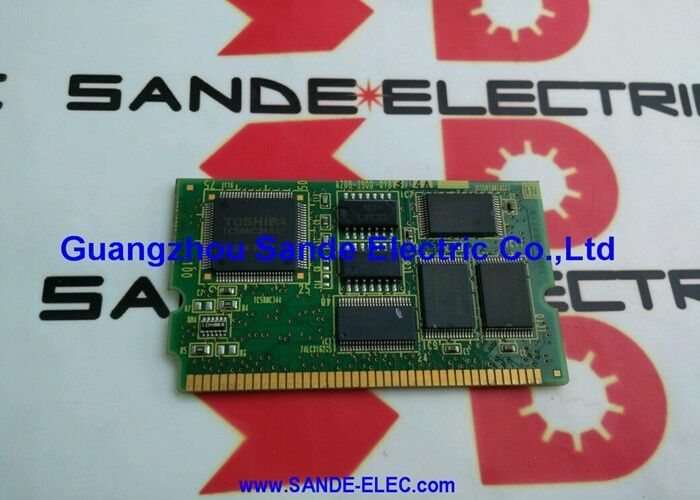
FANUC A20B-3900-0183 | 32 MB FROM + 512K SRAM Memory Module — Series 16i / 18i / 21i Model B CNC
Two Memory Functions on One Module
The A20B-3900-0183 is a plug-in daughter board that combines two distinct memory types in one module, serving different roles within the FANUC i-series CNC control:
32 MB FROM (Flash ROM): Non-volatile storage for the CNC operating software, PMC ladder program, part programme data, and servo parameter files. FROM contents persist without battery power. When the CNC boots, the system software loads from FROM into the working RAM. FROM must be reloaded after module replacement using the correct software package for the installed CNC model and option configuration.
512K SRAM (battery-backed): Holds machine parameters, tool offset data, work coordinate offsets, and other real-time operational data that must survive power cycles. SRAM requires continuous backup battery power to retain its contents. The backup battery is on the CNC main board or in an adjacent battery holder — not in this memory module itself. A depleted battery causes SRAM data loss; always verify battery condition before removing or replacing this module.
Key Specifications
| Parameter |
Value |
| Part Number |
A20B-3900-0183 |
| FROM |
32 MB flash |
| SRAM |
512K battery-backed |
| Compatible CNC |
Series 16i, 18i, 21i Model B |
| Series |
A20B-3900 |
| Origin |
Japan |
Model B — Not the Same as Model A
Within the FANUC 16i/18i/21i family, Model A and Model B use different memory module specifications. The A20B-3900-0183 with 512K SRAM is the Model B variant. The A20B-3900-0163, which carries 1MB SRAM, is typically associated with the Model A generation. Installing a module with the wrong SRAM capacity or FROM version for the installed CNC model will either fail to initialise or produce compatibility errors.
Confirm the installed CNC model letter (Model A or Model B) from the CNC's system information screen before ordering. Confirm the installed module's part number from the label on the PCB — not from documentation alone, as modules can be field-changed during earlier service.
Replacement Procedure Notes
FROM contents are not automatically preserved when the module is removed — back up all FROM data before removal if the software configuration has been modified from the factory state. SRAM data is retained as long as the backup battery remains healthy during the swap; swap the module while the CNC is powered if the procedure allows, or ensure a fresh backup exists before starting. After fitting the replacement, reload FROM software and restore SRAM data from backup before running production.
FAQ
Q1: Does the backup battery sit inside the A20B-3900-0183 module itself?
No. The SRAM backup battery is located on the CNC main board or in a battery holder near the main board — not inside this memory module. Removing this module does not affect the battery. However, if the battery is depleted before or during the swap, SRAM data (parameters, offsets) will be lost. Check battery condition before starting any memory module replacement.
Q2: What data must be reloaded after replacing A20B-3900-0183?
FROM content (CNC operating software, PMC ladder, parameter files) must be reloaded from backup. SRAM data (machine parameters, tool and work offsets) must be restored from backup if it was not preserved during the swap. A complete machine backup covering both FROM and SRAM data is essential before any memory module replacement.
Q3: Can the A20B-3900-0183 (512K SRAM) substitute for the A20B-3900-0163 (1MB SRAM)?
No. Different SRAM capacities serve different CNC model generations with different parameter table sizes. Installing a module with insufficient SRAM causes parameter storage errors. Installing a higher-SRAM module in a system that does not require it may also produce compatibility issues. Always match the exact part number to the installed CNC model.
Q4: The CNC shows a FROM checksum error after power-up. Is the memory module faulty?
A FROM checksum error most commonly indicates that the FROM content was corrupted — either from a power interruption during a write operation or from a deteriorating flash chip. Try reloading the FROM software from a clean backup. If the error persists after reload, the flash memory in the module has degraded and the module requires replacement.
Q5: The CNC shows a memory alarm (SRAM parity error or similar) at startup. Is this the memory module?
A parity error in SRAM can indicate either a depleted backup battery (causing data corruption during power-off) or a failing SRAM chip. Check and replace the backup battery first — if the error clears after battery replacement and SRAM data restoration, the battery was the cause. If the error persists with a confirmed healthy battery and reloaded data, the SRAM in the module has failed and the module requires replacement.



 Your message must be between 20-3,000 characters!