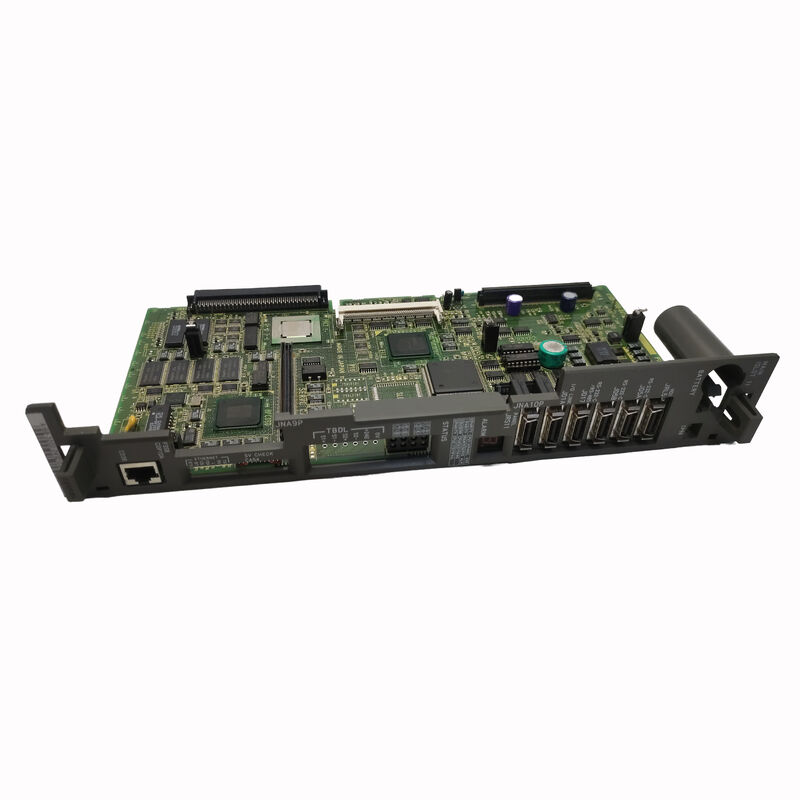
FANUC A16B-3200-0490 | Main CPU PCB — 0i-B Series CNC Master Board, A16B-3200 Family, PMC-SB7, Multi-Axis Control, Plug-In Module Architecture, Japan
Overview
The FANUC A16B-3200-0490 is the main CPU board — the master PCB — for FANUC's i-series CNC control. In the physical architecture of a FANUC CNC system, this is the central board from which everything else in the control cabinet connects or depends.
The servo amplifiers communicate back to this board through the FSSB optical fibre bus. The display PCB (like the A20B-3300-0091) plugs into slots on this board. The PMC ladder (the machine's PLC programme) executes on the processor mounted on this board.
The operator panel's MDI keys send their signals to this board. In short: the A16B-3200-0490 is the nerve centre of the CNC.
Understanding the A16B-3200 family requires understanding the board's plug-in module system.
The generic A16B-3200-0490 board, without its SMD modules, contains the processor, the backplane connectors, the power supply circuits, the diagnostic LED array, and the fixed hardware.
What makes the board specific to a machine is the set of SMD modules plugged into it:
FROM (Flash ROM) modules store the CNC system software — the FANUC operating system, motion control firmware, and any software options (graphic option, DNC option, PMC ladder compilation, etc.) purchased by the machine tool builder.
Without the correct FROM modules, the board has no operating system and cannot start.
SRAM modules store battery-backed data that changes during machine operation — CNC parameters (backlash values, servo gains, axis limits, feed rates), part programmes, tool offset tables, PMC data, and work coordinate offsets.
SRAM is the most valuable data store in the machine because it contains the accumulated commissioning and production setup that makes the machine perform correctly. SRAM battery life is typically 2–5 years.
DRAM modules provide working memory for programme execution — the CNC's active workspace during operation.
Key Specifications
| Parameter |
Value |
| Function |
Main CPU / Master PCB |
| PMC |
PMC-SB7 |
| Module Architecture |
FROM + SRAM + DRAM plug-in |
| Axes |
Multi-axis (software-dependent) |
| Interface |
FSSB, backplane, display slot |
| Status |
Discontinued spare |
| Origin |
Japan |
| Supply Condition |
Board only — no SMD modules |
The A16B-3200 Family — Board Variants and Their Generations
The A16B-3200 series spans multiple FANUC CNC generations, with each generation and sub-series having a specific last-four-digit suffix.
The -0490 places this board in the 0i-B generation, closely related to the -0491 (which is confirmed as the 0i-TB main board running PMC-SB7). Both the -0490 and -0491 are members of the same design generation — they share the same fundamental architecture, accept the same type of SMD modules, and run PMC-SB7 machine ladder logic.
Earlier generations in the A16B-3200 family (such as -0190 for the 16C series, -0090 for 16B) are mechanically similar but are not software-compatible.
SMD modules from a 16C board cannot run on a 0i-B board, and vice versa. Part number verification against the specific machine and CNC series is essential before any A16B-3200 variant is ordered.
Why the Main CPU Board Fails — And How to Know It Has
Main CPU board failures are among the more uncommon failure modes in FANUC CNC systems — they are rated for long service lives, and most machines encounter many spindle drive PCB, servo PCB, and power supply failures before the main board ever fails.
When the main board does fail, the symptoms are usually distinctive:
Complete failure to boot: The CNC powers up, the cooling fans run, the servo amplifiers initialise, but the operator panel display remains blank and no axis movement is possible.
The control appears dead.
This symptom also occurs with FROM module corruption or SRAM battery failure, so systematic diagnosis is important.
Intermittent control faults: Random alarms appearing at unpredictable intervals, especially those that disappear after a power cycle, can indicate a marginal component on the main board — typically a failing electrolytic capacitor or a heat-stressed IC at the edge of its operating specification.
SRAM battery alarm with data loss: If the SRAM battery depletes and data is lost, the board is not faulty — but the SRAM module and battery need replacement and the data must be reloaded from backup.
This is the most common scenario mistaken for a board failure.
Failure after a specific event: Lightning strike, power surge, or gross overcurrent event in the machine's electrical cabinet can damage the main board irreparably.
In these cases, the board failure is certain and replacement without repair is the appropriate path.
Replacing the A16B-3200-0490 — What Must Be Prepared
A main board replacement is a significant maintenance event — it touches the most critical data and configuration in the machine. The following must be in hand before the board is replaced:
All CNC parameters backed up to an external source (memory card, RS-232, Ethernet if available).
The PMC ladder programme backed up separately.
All part programmes backed up. Tool and work offset data recorded or backed up. SRAM and FROM module identification confirmed (module part numbers, firmware version in the FROM).
On installation of the replacement board: transfer the original FROM and SRAM modules from the old board to the new board (if the modules are functional).
If the FROM module is corrupted (preventing boot), new FROM modules loaded with the correct system software from a machine tool builder or FANUC service are required.
Reload all parameters from backup after boot. Verify axis motion, spindle operation, and PMC function before returning the machine to production.
FAQ
Q1: Can the SRAM module from the failed board be transferred to the replacement A16B-3200-0490 to restore all machine data?
Yes, if the SRAM module itself is undamaged. If the original board failed due to a localised fault (failed processor, damaged power supply section) while the SRAM module remained electrically intact, transferring the SRAM to the replacement board restores all parameters, part programmes, offsets, and PMC data in a single step.
Power up the replacement board with the transferred SRAM and FROM modules, and the machine should boot with the original configuration.
If the SRAM battery had depleted before or during the board failure, data may have been lost — the backup then becomes essential.
Q2: The CNC displays "SYSTEM ALARM 911" or "920" after a board replacement. What do these mean?
Alarm 911 (DRAM parity error) and 920 (SRAM parity error) indicate memory faults.
After a main board replacement, these typically appear if: the DRAM module is not fully seated in its slot (reseat firmly); the SRAM module's battery is depleted and data is corrupted (replace battery, reload from backup); or there is a genuine DRAM/SRAM module hardware failure (test with a known-good module).
These alarms do not necessarily indicate a faulty replacement board — they indicate a memory system issue that is often resolved by proper module seating and data reload.
Q3: How many axes can the A16B-3200-0490 control, and is this determined by the board or by the software?
The physical board provides the backplane connections for axis control modules, but the number of axes enabled is determined by the software option registration in the FROM module — not by the board's hardware.
An A16B-3200-0490 with the appropriate axis option registered can control up to the maximum supported by that CNC generation (typically 4 axes for 0i-series).
Adding an axis to an existing machine requires activating the axis expansion option in the system software, not replacing the main board.
Q4: Is the A16B-3200-0490 repairable at board level, or is outright replacement the only option?
Board-level repair is possible through specialist FANUC repair centres. Common repair items on A16B-3200 main boards include: electrolytic capacitor replacement (the most frequent age-related failure), replacement of individual ICs damaged by ESD or power surge, battery holder repair, and connector reconditioning.
Repair is cost-effective when the board failure is a localised component failure rather than generalised PCB damage (burned traces, cracked substrate) from a severe electrical event.
A reputable repair centre will test the board on a FANUC test rig after repair, confirming full functionality before return.
Q5: What is the SRAM battery on the main board, and how often should it be replaced?
The SRAM battery is a lithium cell (typically 3V coin cell or lithium AA, depending on the battery holder configuration on the specific board variant) that maintains power to the SRAM module when the machine is powered off, preserving all stored data.
FANUC specifies a replacement interval of approximately 1 year, though in practice many batteries last 2–5 years at room temperature before the voltage drops below the SRAM's minimum sustaining level.
The CNC generates a low-battery alarm (typically ALM 7001 or similar) when voltage drops below the warning threshold — this alarm should be acted on immediately, as data loss occurs when the battery reaches zero.
Battery replacement should be performed with the machine powered on (so the SRAM draws live power during the swap) to prevent data loss during the procedure.


 Your message must be between 20-3,000 characters!