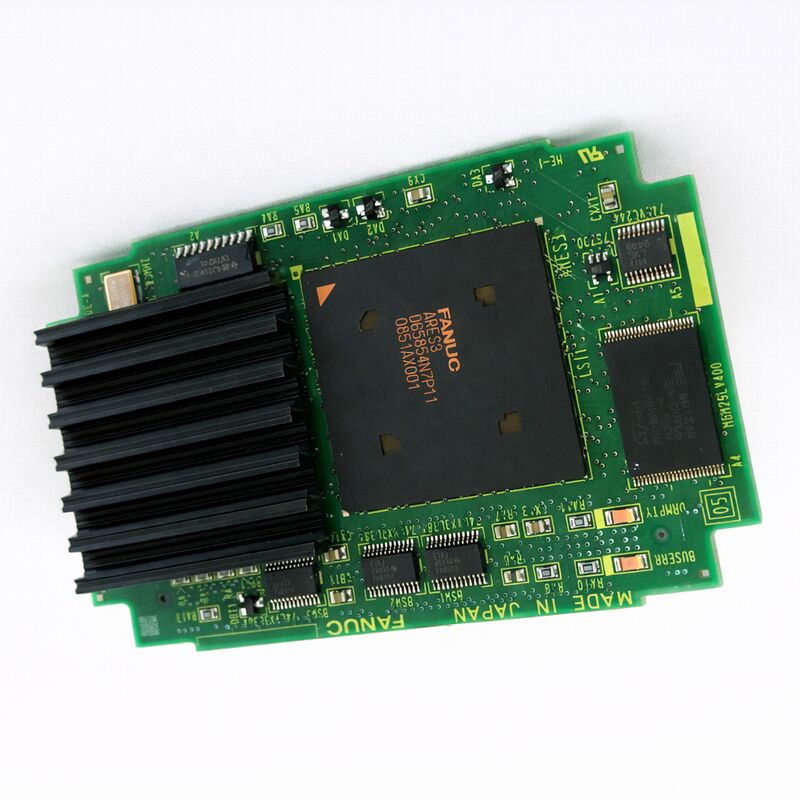
FANUC A20B-3300-0293 | 486 CPU Module with 16MB DRAM — A20B-3300 Series, i-Series CNC Processor Card for 15i/16i/18i/21i Controllers, Japan Origin
Overview
The FANUC A20B-3300-0293 is a 486 processor module — the "brain" plug-in card for FANUC's i-series CNC controllers. Sitting inside the CNC's controller chassis on the main CPU board, this compact module determines how fast the CNC can process programme blocks, how quickly interpolation calculations complete, and how smoothly the system manages simultaneous multi-axis coordination.
The 486DX processor architecture, while now historical by consumer computing standards, represented a capable and well-proven platform for industrial real-time control applications during the i-series CNC generation — and the machines running these controllers continue to produce precision parts daily around the world.
The A20B-3300 module family covers FANUC's i-series processor and memory modules, with different part numbers providing different processor generations and memory capacities to support various CNC configurations.
The A20B-3300-0293 is one of the 486-with-16MB-DRAM variants within this family — a configuration that was widely deployed in Series 15i, 16i, 18i, and 21i CNC controllers across both the A (first generation i-series) and B (model B) hardware generations.
Machines fitted with i-series CNC controllers were built through the late 1990s and throughout the 2000s by virtually every major machine tool manufacturer — Mori Seiki, Mazak, Okuma, Makino, Doosan, and hundreds of others.
The total installed base is enormous, and many of these machines continue in production service, creating ongoing demand for A20B-3300-series CPU modules as the electronics age.
Key Specifications
| Parameter |
Value |
| Processor |
Intel 486DX architecture |
| On-Board DRAM |
16 MB |
| Compatible CNC Series |
FANUC 15i, 16i, 18i, 21i |
| Installation |
Plug-in module on main/sub-CPU board |
| Series |
A20B-3300 |
| Status |
Available — refurbished, tested |
| Origin |
Japan |
The 486 CPU in i-Series CNC Architecture — Why It Still Matters
The Intel 486DX processor architecture in the A20B-3300-0293 might seem anachronistic in 2025, but it remains the correct and irreplaceable processor for its application.
FANUC's i-series CNC software was developed specifically for this processor architecture — the system software, the interpolation algorithms, the servo communication protocols (including FSSB), and the PMC execution engine all run on this hardware and were not designed for, nor ported to, any other processor architecture.
There is no upgrade path to a faster modern processor — the A20B-3300-0293 (or a directly compatible variant) is what the controller needs.
The 486DX's architecture provided capabilities that were important for CNC applications of its era: a floating-point unit (FPU) integrated on-chip, allowing trigonometric interpolation calculations without the overhead of an external math coprocessor; integer performance sufficient to execute PMC ladder logic scanning at the rates required for responsive machine control; and memory bus characteristics compatible with the real-time data access patterns of CNC operation.
The 16MB DRAM on the module is the working memory for all active CNC computation.
Programme execution, parameter retrieval, motion command buffering, and PMC data tables all draw on this memory.
As FANUC expanded the i-series feature set through successive software versions, the memory requirements grew — the 16MB configuration supports the full feature set of the i-series within its generation, while earlier configurations with less DRAM limited which options could be active simultaneously.
CPU Module vs Memory Module — Understanding the A20B-3300 Family
A common source of confusion when maintaining i-series CNC controllers is the distinction within the A20B-3300 family between CPU modules (which contain a processor) and memory-only modules (which contain only DRAM or SRAM). The A20B-3300-0293 is a CPU module — it contains both the 486DX processor and 16MB DRAM on the same physical card.
This distinguishes it from boards like the A20B-3300-0310 (which is a DRAM-only module that installs alongside a CPU card on a sub-CPU board).
When diagnosing a startup failure in an i-series controller, knowing whether the controller uses a CPU module (like the -0293) or a separate CPU and memory module configuration determines which board to target first.
A controller that fails to boot and shows an early startup alarm before the display initialises likely has a CPU module fault. A controller that boots partially but shows memory-related alarms may have a memory module fault rather than a CPU module fault.
Startup Sequence — How to Identify CPU Module Failure
FANUC i-series controllers go through a defined startup sequence at power-on. The diagnostic LEDs on the main CPU board show a sequence of codes as the system progresses through self-test and initialisation. Understanding this sequence helps isolate CPU module failures:
When power is applied, the first codes produced are driven by the boot ROM on the main board — this code runs before the CPU module's processor is fully operational, checking the basic hardware.
If the LED sequence stops at an early code that would normally proceed as the CPU module begins its initialisation, the CPU module is suspect.
Once the CPU module's 486 processor begins executing, the codes advance more rapidly through the system's self-test.
If the sequence stops at a code in the middle of this progression, the specific code identifies which subsystem check failed — the FANUC i-series maintenance manual documents each code's meaning.
If the display board initialises but shows only a dark screen or a system alarm on the display, the CPU module has at least started and reached a point where it can output display data — which paradoxically suggests a different fault source if the CPU module itself was the suspect.
FAQ
Q1: The i-series controller shows "LED sequence stops at an early stage" at power-up and never reaches the normal operating display. How can the CPU module be confirmed as the cause?
Cross-check the LED code against the FANUC i-series maintenance manual for the specific CNC model. If the code indicates a CPU initialisation failure specifically, the A20B-3300-0293 is suspect.
As a practical test: if a known-good CPU module from an identical working machine is temporarily installed and the sequence progresses normally, the original module is confirmed faulty. Also check the module's edge connectors and the socket on the main board for contamination or physical damage before concluding the module itself has failed.
Q2: Is the A20B-3300-0293 compatible with both Series 16i-A and 16i-B hardware generations?
The A20B-3300 CPU module family spans multiple i-series hardware generations. Whether the -0293 is compatible with both 16i-A and 16i-B depends on the specific motherboard and system software version. Within the family, different part number suffixes (such as -0290, -0291, -0293, -0295) may be associated with different hardware generations or motherboard connector standards.
Verify compatibility against the specific machine's hardware list before ordering.
The machine's electrical documentation should list the exact CPU module part number installed at the factory.
Q3: After replacing the A20B-3300-0293, the CNC boots but shows slower block processing than before. Could the CPU module be defective?
If the CNC boots and operates but block processing seems slow, the CPU module is operating but may have an issue with its processor clock or cache. More commonly, apparent slowness after CPU module replacement is caused by a different CPU module variant being installed that operates at a lower clock speed or has less DRAM — confirm the replacement module's part number exactly matches the original.
Also consider that what appears as "slower processing" after board replacement may actually be the system performing data verification or re-calibration operations during its first cycles of operation.
Q4: Can the 16MB DRAM on the A20B-3300-0293 be expanded or upgraded by adding a separate memory module?
The DRAM on the A20B-3300-0293 is integrated on the CPU module itself and cannot be expanded independently.
If the system requires more working memory, the option is to install a higher-capacity CPU module (one with 32MB or more DRAM if available for the specific CNC platform) or to install an additional DRAM module on the sub-CPU board alongside the CPU module, following the specific configuration rules published in FANUC's hardware connection manual for the CNC series.
Q5: How should the A20B-3300-0293 be stored when kept as a spare part?
Store in the original antistatic packaging or equivalent ESD-safe antistatic bag. Keep away from humidity, temperature extremes, and direct sunlight.
The module contains CMOS processor and DRAM ICs that are sensitive to electrostatic discharge — even brief storage on non-antistatic surfaces builds up charge that can cause latent damage. Ideal storage conditions: sealed antistatic bag, dry environment at 10–25°C, away from magnetic field sources (motors, transformers), and not stacked with other bare PCBs without foam separation between boards.


 Your message must be between 20-3,000 characters!