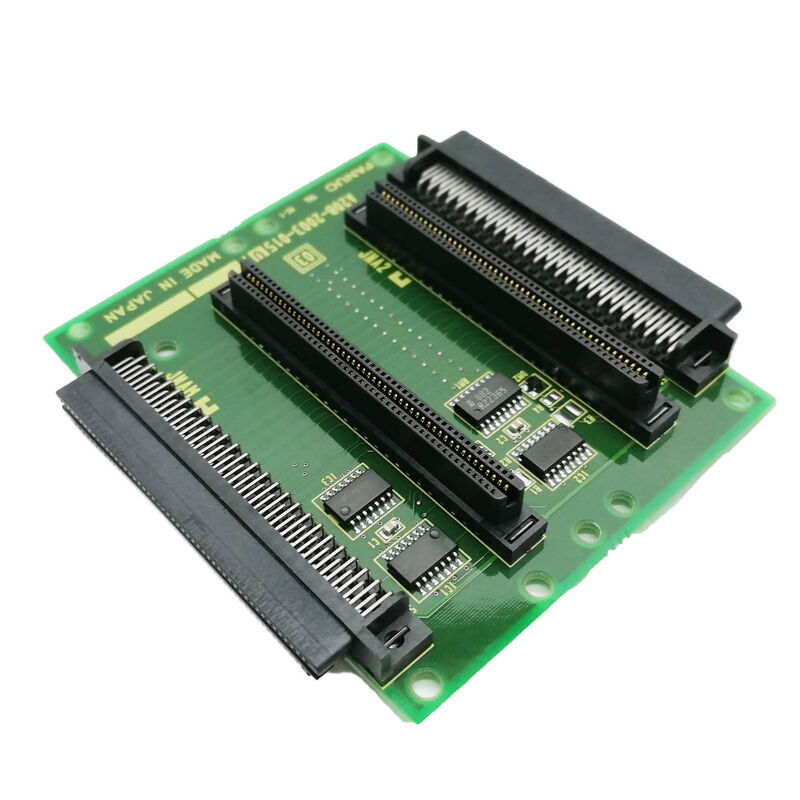
FANUC A20B-2003-0810 | 1-Slot Back Panel — For FANUC Series 30i-A / 31i-A / 32i-A CNC, Single Expansion Slot Backplane, A20B-2003 Series, Japan Origin
Part Number: A20B-2003-0810
Manufacturer: FANUC Corporation (Japan)
Product Category: PCB — Back Panel / Backplane Board
Series: A20B-2003
Overview
The FANUC A20B-2003-0810 is the single-slot back panel for FANUC's 30i-A / 31i-A / 32i-A CNC control system basic unit — and its role is precisely defined within FANUC's hardware architecture for these high-end controllers.
The 30i/31i/32i-A basic unit is a self-contained control electronics assembly, distinct from the operator panel.
It houses the main CPU board, the power supply, and a back panel. The back panel determines how many option slots are available in that assembly. With the A20B-2003-0810, that number is one. With the no-slot panel (A20B-2003-0600), it's zero. With the two-slot panel (A20B-2003-0610), it's two.
The single slot provided by the A20B-2003-0810 is sufficient for many 30i/31i/32i-A installations.
A machine that needs fieldbus connectivity uses the one slot for a Profibus master or DeviceNet board.
A machine that needs factory network connectivity uses it for the Fast Ethernet board.
One option board is a common configuration on machines where the built-in FSSB servo interface, serial spindle, I/O Link, and embedded Ethernet on the main board already cover all the connectivity requirements except for one additional protocol.
Key Specifications
| Parameter |
Value |
| Slot Count |
1 (single expansion slot) |
| Compatible CNC |
FANUC Series 30i-A, 31i-A, 32i-A |
| Architecture |
Basic unit back panel |
| Board Type |
Passive backplane |
| Board Family |
A20B-2003 |
| Related Parts |
A20B-2003-0600 (no slot), A20B-2003-0610 (2 slots) |
| Status |
Available — refurbished |
| Origin |
Japan |
The 30i/31i/32i-A Basic Unit Architecture
The FANUC Series 30i/31i/32i-A controllers use a modular architecture where the basic unit is a self-contained control rack.
The back panel is the structural and electrical backbone of this unit.
Inside the basic unit chassis:
- The main CPU board (such as the A20B-8101-0400/0401 family for the LCD-mounted type) plugs into the back panel's main board position
- The power supply module (A20B-8101-0010) occupies the power supply position
- Option boards install in the back panel's expansion slot positions
The A20B-2003-0810's single expansion slot accepts boards from the A20B-8101 option family — Profibus master (A20B-8101-0050), Profibus slave (A20B-8101-0100), DeviceNet master (A20B-8101-0220), DeviceNet slave (A20B-8101-0330), Fast Ethernet (A20B-8101-0030), FL-net (A20B-8101-0031), and others.
Each plugs into the expansion slot and connects electrically to the CNC's main board through the back panel's bus traces.
Choosing the Correct Back Panel Configuration
When replacing the A20B-2003-0810 or building a 30i/31i/32i-A basic unit for a retrofit, the back panel selection depends on how many option boards the application requires:
No option boards needed: Use A20B-2003-0600 (no slot). The machine uses only the connectivity built into the main board — FSSB, serial spindle, I/O Link, embedded Ethernet — and no additional fieldbus or communication options.
One option board needed: Use A20B-2003-0810 (1 slot — this board).
The machine requires exactly one additional communication option such as Profibus, DeviceNet, FL-net, or Fast Ethernet.
Two option boards needed: Use A20B-2003-0610 (2 slots). The machine requires two additional communication options simultaneously.
Using a back panel with fewer slots than needed leaves no room for required option boards.
Using one with more slots than needed causes no functional issues — the empty slot simply goes unused.
The physical dimensions of the basic unit housing determine which back panel physically fits, so always confirm the housing configuration before ordering.
FAQ
Q1: The 30i-A basic unit was working with one option board installed. The back panel was damaged. Must I use the same A20B-2003-0810, or can I use the A20B-2003-0610 (2 slots)?
Physically, the A20B-2003-0610 (2 slots) can replace the A20B-2003-0810 (1 slot) if the basic unit housing accommodates the different back panel form factor.
The back panel must physically fit the chassis — FANUC's housing variants are designed around specific slot counts.
Confirm the housing part number accommodates a 2-slot back panel before substituting.
Functionally, having an empty second slot causes no problems — the option board remains in the used slot and the empty slot is simply unused.
Q2: The 30i-A controller has a Profibus master board in the expansion slot. Can the back panel be replaced without removing the Profibus board?
Remove the option board from the slot before removing the back panel from the chassis.
The back panel and option board are separate components — the back panel is removed by disengaging its chassis mounting hardware while the option board is separately unplugged from the slot connector.
Reinstall in reverse order: back panel first, then option board into the accessible expansion slot.
Q3: After replacing the A20B-2003-0810, the Profibus option board generates an alarm that was not present before. What should be investigated?
Reinstallation errors are the most common cause of option board alarms after a back panel replacement.
The board may be seated only partially in the slot connector — an edge connector that appears plugged in but is misaligned or partially engaged produces exactly this symptom.
Reseat the board firmly and evenly. Also verify that all external cables to the option board (Profibus network cable, etc.) were correctly reconnected after the swap.
Q4: What is the difference between the "back panel" used in the 30i/31i/32i-A series and the backplanes used in earlier FANUC Series 16/18 controllers?
The 30i/31i/32i-A basic unit uses a compact back panel designed specifically for the high-end i-series controller's physical and electrical architecture.
Earlier Series 16/18 controllers used different rack backplane designs with different slot counts, connector types, and bus architectures.
The A20B-2003-0810 is not interchangeable with backplane boards from 16/18 series controllers. Always use the back panel specified for the specific CNC generation and chassis.
Q5: Does replacing the A20B-2003-0810 back panel require any data backup or parameter changes?
No. The back panel is a passive interconnect board — it stores no data.
After replacement, all parameters and programmes remain in the FROM/SRAM modules on the main board, which were not disturbed.
Reinstall the main board, power supply, and option boards in the new back panel, power up normally, and verify system function. No data entry is required unless other boards were also replaced during the same maintenance event.


 Your message must be between 20-3,000 characters!