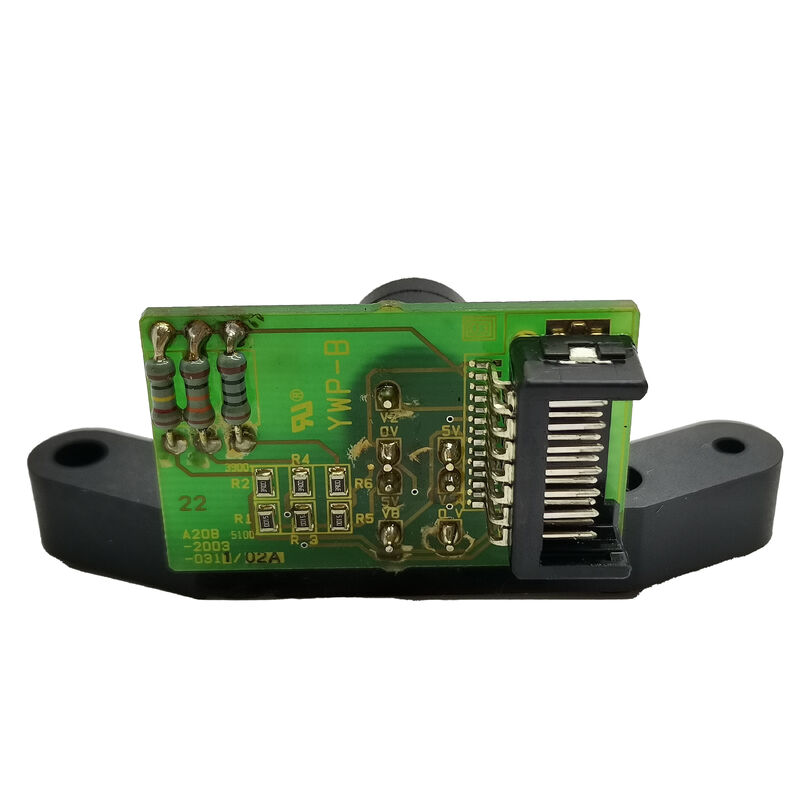
FANUC A20B-2003-0990 | CNC Backplane PCB — A20B-2003 Control Series, Passive Rack Interconnect Board, Industrial CNC Infrastructure, Japan Origin
Part Number: A20B-2003-0990
Manufacturer: FANUC Corporation (Japan)
Product Category: PCB — Backplane / Back Panel Board
Series: A20B-2003
Overview
The FANUC A20B-2003-0990 is a backplane board from FANUC's A20B-2003 series — the family that supplies passive rack interconnect hardware across FANUC's i-series CNC controller generations.
Backplane boards are foundational infrastructure: they create the physical and electrical framework that turns a collection of individual plug-in control cards into a functioning CNC control system.
Every module in a FANUC CNC control rack — the main CPU board, the power supply unit, the axis control card, any option communication boards — connects to the CNC's internal bus and power distribution through the backplane.
The backplane itself does not process data or generate signals. What it does is make all the other boards possible: without a functioning backplane, plug-in modules have no power and no bus connection, and the CNC cannot operate regardless of how good the individual module hardware is.
The A20B-2003 family covers backplane configurations for a range of FANUC controller assemblies.
Different part numbers in the family serve different slot counts and physical layouts matched to specific control rack configurations.
This variety ensures that compact controllers with few option slots and large controllers with multiple expansion positions each have an appropriate backplane for their architecture.
Key Specifications
| Parameter |
Value |
| Board Type |
Passive backplane (no active processing) |
| Function |
Power and bus signal distribution |
| Series |
A20B-2003 |
| Compatible Architecture |
FANUC CNC modular control rack |
| Operating Supply |
System-supplied internal DC |
| Status |
Available — refurbished |
| Origin |
Japan |
Understanding CNC Rack Backplane Architecture
FANUC's modular CNC architecture distributes control functions across separate plug-in boards. A typical i-series CNC controller rack might contain a main board, a power supply module, an axis control card, and one or two option boards — all plugged into the backplane.
The backplane handles three distinct functions for this assembly:
Mechanical anchoring. Each plug-in module's edge connector mates with the backplane's matching connector.
The backplane's physical structure holds the module firmly in place despite the vibration that a production machine tool generates. A good backplane keeps cards seated reliably.
A worn or damaged backplane allows intermittent seating that produces faults indistinguishable from module failure.
Power distribution. The CNC's internal power supply delivers regulated DC voltages through the backplane's copper traces to each slot.
The traces are sized to carry the combined current of all installed modules without excessive voltage drop.
Bus interconnection. The CNC's internal data bus runs through the backplane connectors.
Every module that needs to participate in CNC operation connects to this bus through the backplane.
The backplane's traces carry these signals with the integrity needed for reliable high-speed digital communication in an electrically noisy industrial environment.
When a Backplane Needs Replacement
Backplane boards are robust. They outlast most of the active boards plugged into them. But they do fail, usually from physical causes rather than electronic component aging:
Physical damage. Dropping the controller chassis, overtightening mounting screws, or forcing a misaligned module into a slot can crack the PCB substrate.
A crack breaks copper traces and creates an open circuit in a power rail or bus signal path.
Connector wear. Repeated module insertion and removal cycles wear down the spring contacts in the backplane's edge connectors.
When contacts lose their spring tension, they no longer make reliable electrical contact with the module's edge connector fingers.
Contamination. Coolant mist, metallic dust, or cleaning solvents entering the controller cabinet can deposit conductive material on the backplane surface, bridging gaps between copper features that should be isolated.
The resulting leakage current can trigger power alarms or damage powered components.
Identifying a backplane as the fault source — rather than one of the active modules — requires systematic elimination. Test the modules in other slots or on a test rig if possible.
If modules that behave correctly in other positions consistently fail in one slot, the backplane is the likely culprit.
FAQ
Q1: How can the A20B-2003-0990 backplane be confirmed as the fault source rather than the plug-in module?
Move the suspect plug-in module to a different slot of the same type, if available in the same rack. If the module works in the alternate slot, the original slot's backplane section has failed. Confirm by checking connector pin condition and running a continuity test on the backplane's power rail traces.
A signal trace check — verifying that bus signals appear at the slot's connectors when the system is powered — can also isolate whether the backplane is passing bus data correctly.
Q2: Does replacing the A20B-2003-0990 require any CNC parameter changes or data backup?
No. The backplane stores nothing — no parameters, programmes, or configuration data. After physical replacement, reinstall all modules and apply power.
Verify the system starts normally and all modules communicate correctly.
If the modules were not disturbed and are correctly reseated, the system should restart identically to its state before the backplane failure.
Q3: Are A20B-2003 series backplane boards specific to one CNC model, or can they be used across different CNC generations?
Each A20B-2003 part number is designed for a specific controller rack configuration — the connector positions, slot count, and physical dimensions are matched to the chassis it belongs to.
Do not substitute a different A20B-2003 part number for the -0990 without confirming physical and connector compatibility against the specific control rack being serviced.
Q4: The backplane's connector pins look bent but not broken. Can they be straightened rather than replacing the whole board?
Individual bent pins can sometimes be carefully straightened with a fine dental pick or pin straightening tool, provided the pin has not been work-hardened through multiple bending cycles and the surrounding substrate is undamaged.
After straightening, confirm pin spring tension is restored by inserting a known-good module and checking for solid electrical contact.
If straightening does not restore reliable seating, board replacement is the correct path.
Q5: Is ESD protection needed when handling this backplane board?
Yes. Although the A20B-2003-0990 is a passive board with no active ICs, its surface-mount passive components and connector contacts are susceptible to static discharge damage. Always use an ESD wrist strap when handling any FANUC PCB. Handle the board by its edges.
Do not slide it on non-antistatic surfaces. Store in an antistatic bag when not installed.


 Your message must be between 20-3,000 characters!