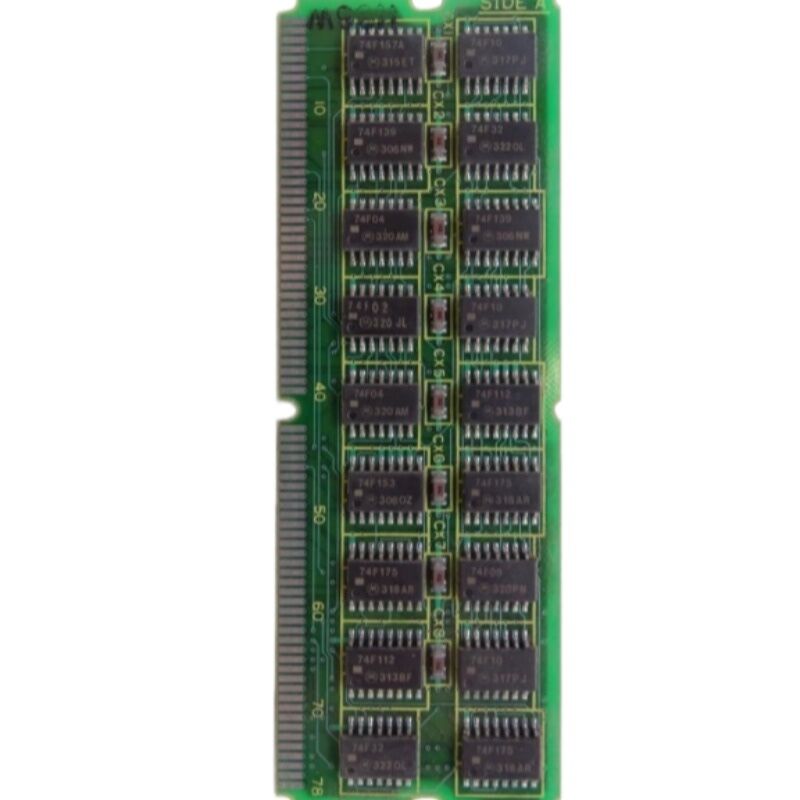
FANUC A20B-2900-0450 | R-J Control M32i Module — FANUC Robot Controller, Japan Origin
Part Number: A20B-2900-0450
Manufacturer: FANUC Corporation (Japan)
Product Type: R-J Control M32i Module (PCB)
Board Series: A20B-2900
Compatible Systems: FANUC R-J Series Robot Controllers
Overview
The A20B-2900-0450 is the R-J Control M32i Module for FANUC's R-J series robot controllers. The R-J was FANUC's main-line robot controller platform for its generation — the controller that managed all aspects of robot motion, program execution, I/O, and communication for FANUC's industrial robot arms.
The M32i module is the controller's central processing board: the component that runs the robot's control software, executes the motion programs, manages the teach pendant interface, and coordinates the servo drives for all robot axes.
FANUC robot controllers from the R-J generation remained in service across automotive assembly, arc welding, material handling, and part loading applications for many years. These controllers remain in production use at facilities that maintain their robot fleet. When the M32i module fails, the robot does not operate — motion is impossible without the central processor.
The A20B-2900-0450 is the replacement part that restores function to a failed controller.
Key Specifications
| Parameter |
Value |
| Part Number |
A20B-2900-0450 |
| Manufacturer |
FANUC Corporation |
| Product Type |
R-J Control M32i Module |
| Board Series |
A20B-2900 |
| Compatible Systems |
FANUC R-J Series Robot Controllers |
| Function |
Central CPU for robot motion and control |
| Origin |
Japan |
| Operating Temperature |
0 – 55°C |
| Storage Temperature |
−20 – 60°C |
| Humidity |
75% RH max (non-condensing) |
| Condition Available |
New (surplus) / Refurbished / Repaired |
The R-J Controller Architecture
FANUC R-J controllers used a modular board architecture. The M32i module was the primary processor — it ran the robot's operating software, executed motion programs, and managed all high-level control functions. Supporting boards handled servo communication, I/O, and peripheral interfaces, but all depended on the M32i module for their coordination.
This modularity was deliberate. Individual boards could be replaced independently when they failed, without requiring replacement of the complete controller.
The M32i module was the most critical single component — a failure here stopped the robot regardless of the condition of all other boards.
The module plugs into the controller's main board structure through defined connectors.
After installation of a replacement module, the robot's software — programs, system variables, mastering data — must be restored from backup.
The module hardware provides the processing capability; the software content determines what the robot does with it.
Robot Mastering and Module Replacement
Mastering data is one of the most critical pieces of information in a robot controller. It is the calibration that links the robot's joint encoder positions to the robot's physical position in space. If mastering data is lost — which happens when the controller's SRAM loses power or is not backed up — the robot does not know where it is.
Physical re-mastering is required before the robot can be used for precision work.
When replacing the A20B-2900-0450, mastering data must be restored from backup along with all other system data. If no backup exists, the robot must be physically re-mastered at each axis using reference fixtures or witness marks.
This procedure requires skilled personnel and takes significant production time.
Always take a complete backup before any controller board work.
A complete, current backup transforms a board replacement from a potentially day-long event into an hour-long procedure.
Software Reload After Replacement
After module replacement, the robot controller's software environment must be rebuilt systematically:
Load the system software from the original controller software media or a FROM backup. Then restore all robot programs and system variables including mastering data, tool frames, user frames, and I/O assignments.
Finally, verify operation by running the robot through its programmed positions at low speed before returning to production.
Each step is essential.
Skipping any step risks incorrect robot motion that could damage tooling, fixtures, or the robot itself.
FAQ
Q1: The R-J robot controller powers on but shows a system error before the teach pendant becomes responsive. Is the M32i module the likely fault?
A system error that prevents the teach pendant from becoming responsive indicates the CPU module cannot complete its initialization.
This is consistent with an M32i module fault. Confirm the controller's power supply voltages are correct first — insufficient voltage can prevent any processor from starting.
If power is confirmed good and the error persists, the M32i module is the primary suspect.
Q2: After M32i module replacement, the robot alarms with a mastering error on all axes. Is this expected?
Mastering data is stored in battery-backed SRAM. If the SRAM data was intact and the backup battery was functional, mastering data should survive a module replacement.
If mastering data was not backed up and is absent after the swap, physical re-mastering is required.
Check the system variables screen for mastering values — if all joints show zero or no mastering data, re-mastering is needed.
Q3: The robot programs survived the module replacement but the robot moves incorrectly. What could cause this?
Incorrect robot motion after a module swap typically indicates incorrect tool frame or user frame data, or mastering data that does not match the robot's physical calibration. Verify the tool frame and user frame data against pre-replacement records.
Run each joint through slow manual motion to confirm its direction and scale are correct before any program execution.
Q4: Can the A20B-2900-0450 from a different robot of the same series be used as a replacement?
If the part number is identical, the hardware is compatible. The software content from the donor robot will differ.
Treat the replacement module as blank hardware and restore the target robot's software from its own backup files.
Never assume programs or parameters from a donor robot are applicable.
Q5: How is mastering data backed up to protect against future module failures?
Mastering data is included in a full SRAM backup from the teach pendant's system menu.
This backup writes all system variables, including mastering data, to a memory card file. Label the card with the robot ID and date.
Store multiple backup generations. Re-back up every time mastering is redone.


 Your message must be between 20-3,000 characters!