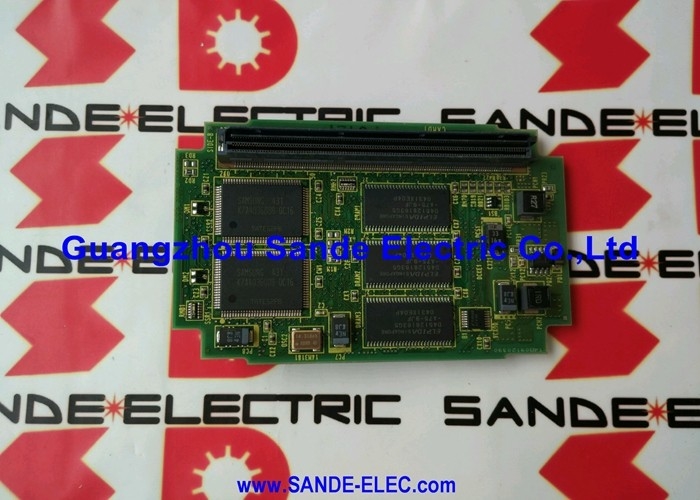
FANUC A20B-2900-0480 | 2MB FROM Flash ROM Module — Series 16/18 CNC / SMD Plug-In / Non-Volatile
2MB of Non-Volatile Storage — Everything the CNC Needs to Boot
The A20B-2900-0480 is the 2MB FROM (Flash Read-Only Memory) module for FANUC Series 16 and 18 CNC controllers. Flash ROM is the non-volatile memory layer in FANUC's CNC architecture — it holds data that must survive complete power loss without battery backup. System software, CNC option data, PMC ladder logic, servo control parameters, and machine-specific configuration are all stored here. The battery-backed SRAM (on a separate module) stores the working data — programmes, tool offsets, active settings — while FROM stores the system itself.
At power-on, the CNC reads the FROM module and loads its contents into working RAM where execution takes place. The FROM module itself is read-only during operation — its contents do not change during normal machine running. They change only when a FROM write operation is performed intentionally: updating system software, loading new PMC ladder, or performing a machine parameter update that writes to FROM.
The SMD format means the module plugs directly into a socket on the main CPU board, without cables or connectors beyond the socket contact. When the module is removed, the CNC's FROM data is absent — the controller cannot complete startup without it.
Key Specifications
| Parameter |
Value |
| Part Number |
A20B-2900-0480 |
| Memory Type |
FROM (Flash ROM) — non-volatile |
| Capacity |
2MB |
| Format |
SMD plug-in module |
| Compatible CNC |
Series 16 (16-M/T) / Series 18 (18-M/T) |
| Contents |
System SW, PMC ladder, servo params |
| Adjacent (1MB) |
A20B-2900-0481 |
| Adjacent (4MB) |
A20B-2900-0680 |
| Status |
Discontinued |
A20B-2900-0480 vs Other FROM Modules — Capacity Determines Compatibility
| Part Number |
FROM Capacity |
Compatible CNC |
| A20B-2900-0481 |
1MB |
Series 16/18 |
| A20B-2900-0480 |
2MB |
Series 16/18 |
| A20B-2900-0680 |
4MB |
Series 16/18/21 |
FROM capacity is matched to the CNC software and options installed. Installing a smaller-capacity FROM module than required causes the system software to fail loading — the module cannot hold the complete software image. Installing a larger-capacity module where a smaller was specified is usually compatible but should be confirmed from the CNC hardware documentation before substituting.
After Replacement — FROM Data Must Be Reloaded
Replacing the A20B-2900-0480 installs an empty or blank flash ROM. The CNC cannot start from a blank FROM. All FROM data — system software (CNC and servo firmware), PMC ladder programme, and FROM-resident parameters — must be reloaded from backup before the machine can operate.
The reload procedure uses FANUC's boot screen FROM write function or the CNC I/O channel to transfer FROM image files from a backup medium. A complete, current FROM backup is mandatory before removal. Without a backup, FROM contents must be obtained from FANUC or the machine builder, which significantly extends downtime.
FAQ
Q1: What happens if the A20B-2900-0480 FROM module fails?
If the FROM module fails, the CNC cannot complete its power-on sequence — the system software is absent. The control either shows a FROM error at boot or fails to start entirely. In some failure modes, the FROM appears to load but contains corrupted data, producing unpredictable CNC behaviour or intermittent alarms only after full startup.
Q2: Can the FROM module be replaced without data loss?
The FROM module is non-volatile — it does not lose data when removed. However, a new (blank) replacement module contains no CNC data. The FROM data from the original module must be backed up before it is removed, then reloaded onto the replacement. If the original module is unreadable (which is often why it is being replaced), the backup must come from an earlier saved copy.
Q3: Is A20B-2900-0480 compatible with Series 16-C or Series 0 CNC?
No. The A20B-2900-0480 is confirmed for Series 16 A/B and Series 18 A/B (16-M, 16-T, 18-M, 18-T). Series 16-C, Series 0, and other FANUC generations use different FROM module formats and are not compatible with the A20B-2900-0480. Confirm the specific Series from the CNC hardware documentation before ordering.
Q4: The CNC shows a system alarm at boot suggesting FROM corruption. Is replacement always required?
Not necessarily. Some FROM corruption conditions — particularly from incomplete software write operations — allow rewriting the FROM module via the boot screen FROM write function without physical replacement. If the FROM module is physically readable and the CNC's boot screen FROM write mode is accessible, a FROM reload should be attempted before replacing the module. Physical module failure (truly unreadable FROM) requires replacement.
Q5: Where is the A20B-2900-0480 sourced after discontinuation?
Through the FANUC Series 16/18 memory module aftermarket — FANUC CNC parts dealers, repair specialists, and tested surplus sources. The A20B-2900-0480 appears frequently in the market as a well-established Series 16/18 consumable spare. Confirm the 2MB capacity and Series 16/18 compatibility before ordering. The /02A revision suffix identifies a specific hardware revision — both base and revision variants serve the same function.


 Your message must be between 20-3,000 characters!