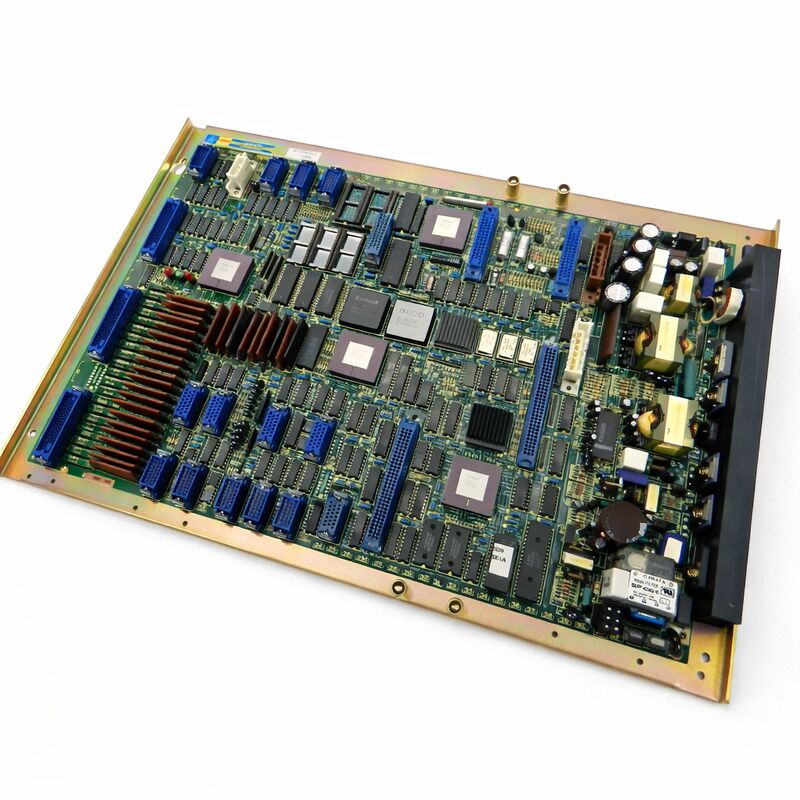
FANUC A16B-1010-0240 | F0-Mate Master PCB — System 10 / 11 / 12 and F0-Mate CNC, Japan Origin
Part Number: A16B-1010-0240
Manufacturer: FANUC Corporation (Japan)
Product Type: Master PCB (Main CPU Board)
Board Series: A16B-1010
Compatible Systems: FANUC System 10, 11, 12; F0-Mate CNC
Axis Control: 2 axes (with optional add-on axis expansion)
Overview
The A16B-1010-0240 is the master PCB — the main CPU board — for FANUC's F0-Mate CNC system and related System 10, 11, and 12 controller platforms.
It is the first-generation digital Mate series master board: the central intelligence of a compact, self-contained CNC unit designed for the lower end of the machine tool market where cost and simplicity mattered alongside reliable digital performance.
The F0-Mate designation identifies this as a complete digital CNC system.
Unlike the larger 0-A and subsequent 0-C series controllers that used a modular rack-based architecture with separate function boards, the F0-Mate concentrated the essential CNC functions onto a single master board.
This board contains the main CPU, the servo interface for two-axis digital control, the I/O section for machine connections, a built-in power supply unit, and support for the PC cassette storage system used in these controllers instead of the PMC-L ladder unit found in the larger 0-series machines.
The board drives a basic monochrome graphics display — adequate for the machine tool applications it was designed for.
These applications were typically small turning centres and compact machining centres where axis count was low, program complexity was moderate, and the priority was reliable digital CNC performance at an accessible price point. The F0-Mate achieved this.
It was a complete, functional digital CNC in a compact package.
Many of these systems remain in productive service today on exactly the machines they were designed for.
Key Specifications
| Parameter |
Value |
| Part Number |
A16B-1010-0240 |
| Manufacturer |
FANUC Corporation |
| Product Type |
Master PCB (Main CPU Board) |
| Board Series |
A16B-1010 |
| Compatible Systems |
FANUC System 10, 11, 12; F0-Mate CNC |
| Axis Control |
2 axes standard (add-on axis expansion available) |
| Storage |
PC cassette (instead of PMC-L) |
| Display |
Basic monochrome graphics |
| Power Supply |
Built-in on board |
| Origin |
Japan |
| Operating Temperature |
0 – 55°C |
| Storage Temperature |
−20 – 60°C |
| Humidity |
75% RH max (non-condensing) |
| Condition Available |
New (surplus) / Refurbished / Repaired |
The F0-Mate in Context
FANUC's 0-series CNC platform was one of the most commercially successful CNC product lines of its era. The full 0-series controllers — 0-A, 0-B, 0-C — powered machining centres and turning centres across the global manufacturing industry.
The Mate variants were FANUC's answer to an important market segment: machine builders who needed a genuine FANUC digital CNC but found the full 0-series too expensive or too large for their compact machine designs.
The F0-Mate provided the core of the 0-series experience — digital servo control, the familiar FANUC programming environment, the standard G-code functionality — in a form factor and at a price that suited smaller machines.
The board's built-in power supply eliminated the need for a separate PSU module. The built-in I/O eliminated separate I/O board requirements for basic machine connectivity.
The two-axis control was standard, with the option to add a third axis through the 1810-0010 add-on board when the machine required it.
The PC cassette storage was a defining characteristic of this generation. Part programs were stored on cassette tapes that could be loaded into the controller.
This was the accepted storage technology of the era for this class of machine.
The Master Board's Role
Every function of the F0-Mate CNC passes through this master board. When the machine operator inputs a command at the MDI keyboard, the master board processes it. When the CNC interpolates a cutting path, the master board calculates the axis positions.
When the PMC logic reads machine inputs and drives machine outputs, those I/O transactions go through the I/O section on this board.
When the display shows the program content or the axis positions, the graphics generation happens on this board.
This concentration of functions means a failed master board stops the machine completely.
There is no partial operation possible when the master board fails — no other board takes over any of its functions.
The machine is down until the board is repaired or replaced.
The diagnostic approach for an F0-Mate with a suspected master board fault starts with eliminating simpler causes.
A power supply fault within the board produces a dark display and no machine response — but this could also be an external power problem.
A CPU fault typically produces an alarm at power-on that the controller cannot clear.
A servo interface fault produces servo alarms at startup without mechanical cause.
Reading the alarm code if one is displayed is the first diagnostic step.
Repair and Maintenance of Legacy Systems
The A16B-1010-0240 is a legacy product. FANUC has long discontinued original production.
The machines that use it, however, are often still productive.
A well-maintained small turning centre with an F0-Mate controller can run reliably for decades — the mechanical components far outlast the electronics in service life, provided the electronics are maintained.
Maintaining a machine with this controller means maintaining access to replacement boards.
The aftermarket supply chain — tested surplus boards, professionally repaired original boards, and exchange services offered by CNC service specialists — supports these machines.
A board-level repair service can often restore a failed A16B-1010-0240 at a cost well below the price of a tested replacement unit, making repair a viable first option when time permits.
FAQ
Q1: The F0-Mate controller shows a blank screen and no response to any input. The machine has no other alarms. What is the likely cause?
A blank screen with no controller response typically indicates a loss of the master board's internal power supply or a catastrophic CPU fault that prevents the startup sequence from running. First confirm that the external supply voltage to the controller is correct.
If external supply is confirmed good, the board's internal power supply circuits have likely failed.
Inspect the board for any blown fuses or visibly damaged components. Board repair or replacement is the appropriate next step.
Q2: The machine runs but the display shows only partial content — some areas are correct and others are garbled. The CNC otherwise operates normally. Is this the master board?
Display corruption with otherwise normal machine operation points to the graphics section of the master board rather than the CPU or servo control circuits.
The CPU is functioning (the machine runs), but the graphics generation circuit has a degraded component.
This type of fault is often repairable at component level by a specialist familiar with this board series.
Q3: The F0-Mate shows a persistent servo alarm on axis 1 at every power-on, before any motion is commanded. The servo motor and cables test as good. What should be investigated on the master board?
A persistent servo alarm at power-on with confirmed good external components points to the servo interface circuit on the master board.
The board's servo LSI or interface circuit is not completing its initialisation.
This is a board-level fault. Before concluding this, verify that the axis interface cable connector at the board is clean and fully seated.
If the connector is confirmed good, the board's servo interface circuit requires attention.
Q4: A replacement A16B-1010-0240 was sourced. Before installation, what data should be prepared?
The F0-Mate controller's parameters — axis parameters, I/O assignments, feed limits, machine constants — are stored on the controller.
On installation of a replacement board, these parameters will need to be restored.
If a parameter backup was taken from the original controller (to cassette tape, through the RS-232 interface, or through any available backup method), that backup will be needed.
Prepare the parameter backup, the part program backup, and confirm the correct system software version for this machine before starting the board replacement.
Q5: The F0-Mate's PC cassette drive has also failed. Is it still possible to operate the machine without the cassette drive?
Part programs in the F0-Mate are normally loaded from cassette or entered directly at the MDI keyboard.
If the cassette drive has failed, programs can still be entered at the MDI keyboard — this is practical for short programs.
For longer programs, a DNC interface via the RS-232 serial port may be an option if the controller's software and the machine's configuration support it.
Consult the F0-Mate connection manual for the RS-232 DNC capability of this specific controller version.


 Your message must be between 20-3,000 characters!