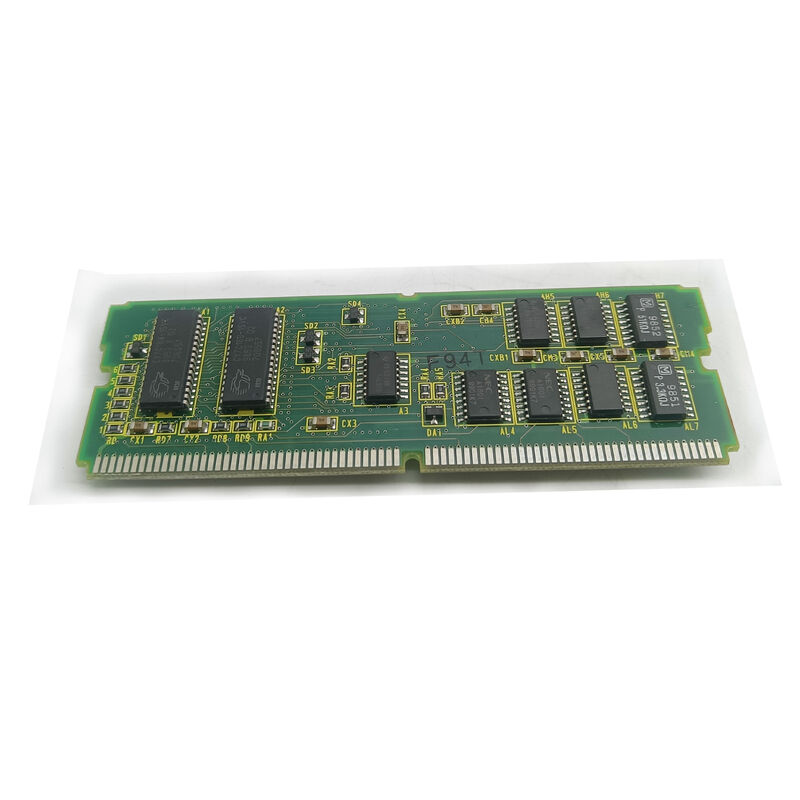
A20B-2902-0020 | FANUC 4MB DRAM Module — Dynamic RAM Memory Expansion / CNC Working Memory / A20B-2902 Series SMD Board
DRAM in CNC Systems — What It Actually Does
The three types of memory in a FANUC CNC serve distinct purposes, and understanding the difference explains why a 4MB DRAM module matters:
FROM (Flash ROM — non-volatile): Stores the CNC system software and long-term data. Non-volatile — retains content without power. Relatively slow for real-time access.
SRAM (battery-backed RAM): Stores CNC parameters and part programmes. Battery-backed to preserve content during power-off. Limited capacity; primarily for persistent data storage.
DRAM (A20B-2902-0020): The working memory — the CPU's high-speed temporary workspace. Every instruction being executed, every variable being computed, every G-code block in the look-ahead buffer, every subroutine stack frame, and every system state variable occupies DRAM during operation. DRAM is fast (matched to the CPU clock), volatile (loses content on power-off), and must be large enough to hold the full working set of the running programme.
When the CNC boots, it copies the system software from FROM into DRAM for fast execution. Everything that happens at runtime passes through DRAM.
Key Specifications
| Parameter |
Value |
| Memory Type |
DRAM (Dynamic Random Access Memory) |
| Capacity |
4MB (4 Megabytes) |
| Type |
SMD daughter board (plug-in) |
| Series |
A20B-2902 |
| Application |
FANUC CNC working memory |
4MB — Working Memory for CNC Operations
The 4MB DRAM capacity of the A20B-2902-0020 provides working memory for the CNC's active operations:
Programme look-ahead: The CNC pre-reads G-code blocks ahead of the current execution point, computing future motion blocks to maintain smooth feedrate through contoured tool paths. 4MB DRAM supports a meaningful look-ahead buffer — the more DRAM available, the more blocks can be pre-computed, allowing smoother high-speed contouring.
System software residence: When the CNC boots, its operating software loads from FROM into DRAM. The loaded software occupies a significant portion of the available DRAM. For FANUC CNC generations that used 4MB DRAM modules, this capacity was matched to the software footprint of that era.
Multi-tasking overhead: PMC ladder execution, display rendering, communication management, and the real-time CNC servo computation all share the DRAM space during operation. 4MB was the capacity matched to these concurrent needs for the CNC generation that uses the A20B-2902-0020.
Application Scenarios
CNC boot failure diagnosis: A FANUC CNC fails to complete startup. System alarm codes point to a RAM error. The A20B-2902-0020 DRAM module is tested and identified as faulty. Replacement allows the CNC to complete boot and resume normal operation.
Intermittent alarm investigation: A CNC develops random unexplained resets in the afternoon of long production days but restarts normally in the morning. Temperature-sensitive DRAM cell failure is suspected. Replacing the A20B-2902-0020 eliminates the temperature-dependent memory fault.
FAQ
Q1: Is the A20B-2902-0020 used with FANUC Series 16, 18, or 20/21 systems?
The A20B-2902-0020 is a 4MB DRAM module in the A20B-2902 series. Similar 4MB DRAM modules in this series (such as A20B-2902-0531) are confirmed for Series 16, 18, and 21. The specific A20B-2902-0020 variant's exact CNC system compatibility is confirmed from the applicable CNC system's hardware documentation. Identify the host CNC system type and verify from the spare parts list.
Q2: Can A20B-2902-0020 be tested outside the CNC?
DRAM modules require specific address, data, and control signals from a host system to be accessed — they cannot be tested with a simple continuity or resistance measurement. In-circuit testing (installed in the CNC with the CNC powered up) is the standard method. Substituting a known-good replacement module and observing whether the CNC boot failure resolves is the most practical diagnostic approach.
Q3: Does replacing A20B-2902-0020 affect stored CNC parameters or programmes?
No. DRAM is volatile — its contents are lost on power-off regardless. CNC parameters are stored in SRAM (battery-backed, separate module); CNC programmes are stored in SRAM or FROM. Replacing the DRAM module does not affect the content of any non-volatile storage. After fitting the replacement, the CNC boots normally and reloads the system software from FROM into the new module.
Q4: What causes DRAM modules to fail in CNC applications?
Common causes: thermal cycling fatigue on solder joints (repeated power-on heating and power-off cooling weakens solder connections over years of use); electrostatic damage from unprotected handling during previous maintenance; power supply voltage transients that stress the DRAM's internal junction voltages; and general component ageing in old modules that have been in service for a decade or more.
Q5: How is the 4MB DRAM different from the SRAM in the CNC's memory system?
DRAM (A20B-2902-0020): fast, high-capacity volatile working memory. Contents lost on power-off. Requires constant refresh cycles to retain data while powered. 4MB capacity for the working environment.
SRAM: slower, lower-capacity, battery-backed non-volatile memory. Retains content when powered off (via lithium battery). Stores parameters and programmes. Replacing SRAM requires data restore from backup; replacing DRAM does not.


 Your message must be between 20-3,000 characters!