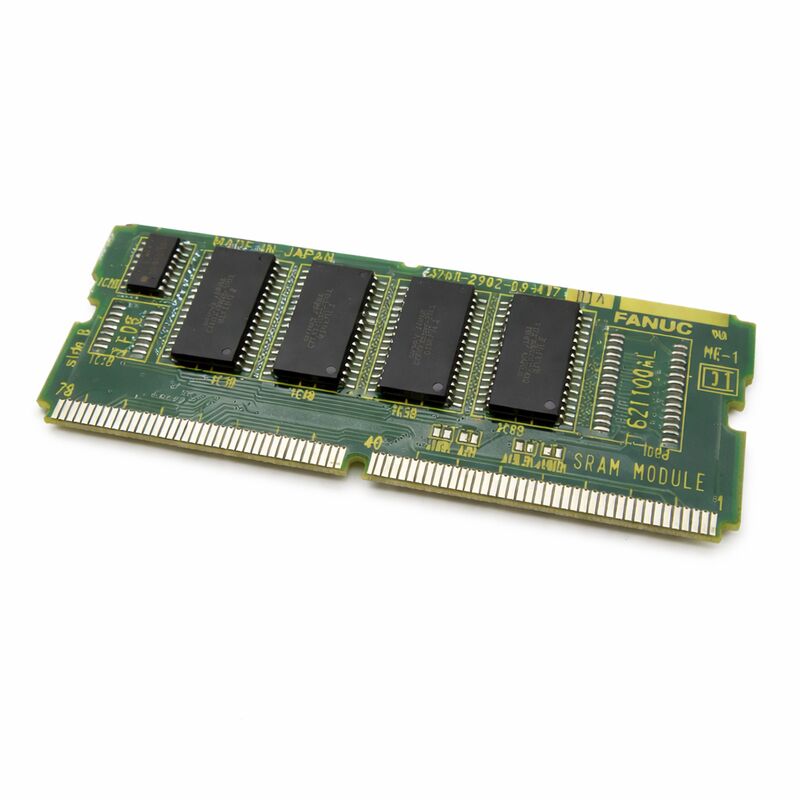
FANUC A20B-2902-0081 | 4 MB FROM (Flash ROM) Module — Series 16 / 18, Japan Origin
Part Number: A20B-2902-0081
Manufacturer: FANUC Corporation (Japan)
Product Type: FROM (Flash ROM) Memory Module — Plug-In Daughter PCB
Memory Capacity: 4 MB Flash ROM
Compatible Systems: FANUC Series 16 / 18 and compatible
Overview
The A20B-2902-0081 is a 4-megabyte Flash ROM module for FANUC Series 16 and 18 CNC systems. It is a plug-in daughter PCB that installs directly on the main CPU motherboard. Flash ROM — abbreviated FROM in FANUC documentation — is non-volatile storage.
The data it holds survives power-off events without a battery. The A20B-2902-0081 is where the CNC's operating software lives.
At power-up, the CNC controller reads the FROM contents and loads them into working memory (DRAM).
The controller then boots and operates from DRAM for speed. The FROM module is the source — everything the CNC knows how to do originates from the software stored on this board. System software, servo control software, spindle control software, PMC ladder program, and custom macro libraries all reside in FROM.
When the FROM module fails or its contents become corrupted, the CNC cannot boot.
The startup sequence halts at the point where FROM loading fails.
The machine is down. Replacing the module restores the hardware; reflashing or reloading the software content restores the system to operation.
Key Specifications
| Parameter |
Value |
| Part Number |
A20B-2902-0081 |
| Manufacturer |
FANUC Corporation |
| Product Type |
FROM (Flash ROM) Memory Module |
| Board Series |
A20B-2902 |
| Memory Type |
Flash ROM (non-volatile) |
| Capacity |
4 MB |
| Compatible Systems |
FANUC Series 16 / 18 and compatible |
| Design |
Plug-in daughter board |
| Power-up Behaviour |
Contents loaded into DRAM at boot |
| Battery Required |
No — Flash ROM is inherently non-volatile |
| Origin |
Japan |
| Operating Temperature |
0 – 55°C |
| Storage Temperature |
−20 – 60°C |
| Humidity |
75% RH max (non-condensing) |
| Condition Available |
New / Refurbished / Repaired |
Flash ROM — Non-Volatile by Design
Flash ROM does not need a backup battery. The data it holds is retained through power cycles, power surges, and extended storage because the storage mechanism is non-volatile at the physics level.
Electrons are trapped in floating gate structures — they remain trapped without any external power source.
This is what makes FROM the right storage medium for system software.
Programs that change at every power cycle would be a problem in FROM — Flash has a finite write cycle endurance. But system software is not rewritten on every cycle.
It is written once during system setup or upgrade and remains stable through thousands of power cycles.
The practical implication: if the CNC powers down abnormally — sudden power cut, voltage transient — the FROM contents are intact.
The data is not at risk in the way battery-backed SRAM data is at risk from a dead battery.
FROM provides unconditional data retention for the software it holds.
4 MB Capacity — What It Accommodates
Four megabytes is sufficient for a full FANUC Series 16/18 software installation including standard option software.
The allocation covers the CNC kernel, axis control software, spindle control software, PMC ladder runtime environment, and the standard suite of control functions.
User-defined macro programs and custom cycles occupy space within this allocation.
Systems with very large custom macro libraries or extensive option software configurations may push toward this limit.
In those cases, a larger FROM module in the same family addresses the constraint. Verify the existing module's capacity from the installed board label before sourcing a replacement.
What Happens When FROM Content Is Corrupted
FROM corruption is not a common event, but it does occur. Power transients during a write operation — if the CNC firmware is being updated when power cuts — can leave FROM content partially written and unexecutable. Physical damage to the Flash memory cells from electrostatic discharge, voltage spikes, or extended exposure to conditions beyond the operating specification also produces corrupted FROM.
A corrupted FROM produces a system that cannot boot to a normal operating state.
The CNC may display a ROM or boot error, stop mid-sequence during startup, or fail to initialise specific functions. These symptoms direct the diagnosis to the FROM module specifically.
Replacing the module hardware is only part of the solution. The replacement module arrives blank or with incorrect software.
The correct software version must be loaded before the machine can operate.
Know the CNC model, option configuration, and software version before sourcing a replacement module — these determine which software load is required.
FAQ
Q1: The CNC shows a ROM parity error alarm at startup. Is the A20B-2902-0081 the most likely fault?
ROM parity alarms are generated when the CNC detects that FROM content fails its integrity check. The FROM module is the primary suspect. Before replacing the module, reseat it — confirm it is fully inserted in its socket.
A partially seated FROM module causes the same alarm as a failed or corrupted one. If the alarm persists with the module fully seated, proceed to replace it.
Q2: A replacement A20B-2902-0081 was installed. The CNC does not boot. What is the next step?
A blank or incorrectly loaded FROM module will not boot the CNC. Access the boot screen (hold appropriate key combination during power-on for Series 16/18) and load the system software from a memory card or another source with the correct software version.
This is a normal and expected step whenever a FROM module is replaced.
The hardware change is only complete after software is loaded.
Q3: Can the FROM content be backed up before replacing the module?
Yes. The CNC's boot screen menu on Series 16/18 systems includes a FROM backup option that copies the FROM contents to a memory card or I/O device.
If the existing module is still partially functional — able to boot, even with errors — take a FROM backup before removing the module.
A backup file can be restored to the replacement module, avoiding the need to source the software from another path.
Q4: After a power transient during a CNC software update, the machine will not boot. Is the FROM module damaged?
A power interruption during a FROM write operation is a known cause of FROM corruption. The module hardware itself is typically undamaged — the Flash cells retain their last written state. The corruption is in the data content, not the hardware.
Reload the software from a known-good backup or software package. If the boot screen is accessible, proceed with the reload from there.
If not, the module may need to be replaced before the software can be loaded.
Q5: Is the A20B-2902-0081 interchangeable with other 4 MB FROM modules in the A20B-2902 series?
FROM modules in the same series with the same capacity are often interchangeable at the hardware level, but the software content and compatibility must be verified for the specific CNC model. A module with the identical part number is a confirmed hardware match.
A different part number with the same capacity may or may not be software-compatible.
Confirm with the system documentation or a FANUC-familiar service resource before substituting a different part number.


 Your message must be between 20-3,000 characters!