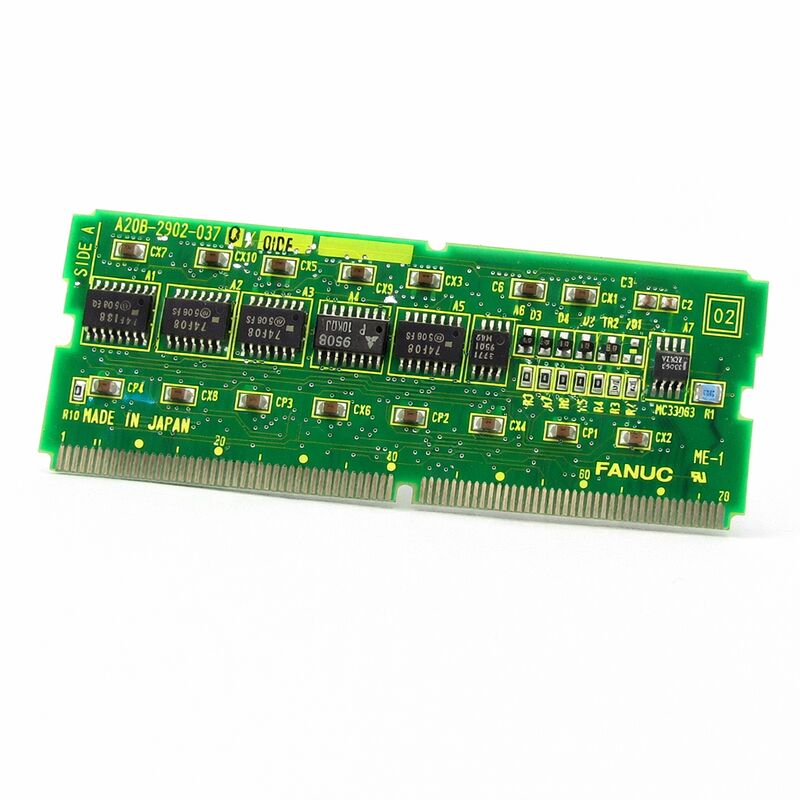
FANUC A20B-2902-0210 | SRAM 1 MB CMOS Memory Module — Plug-In PCB, Japan Origin
Part Number: A20B-2902-0210
Manufacturer: FANUC Corporation (Japan)
Product Type: SRAM Memory Module PCB (CMOS Design)
Memory Capacity: 1 MB SRAM
Technology: CMOS
Overview
The A20B-2902-0210 is a 1 MB SRAM memory module for FANUC CNC and automation control systems.
It belongs to the A20B-2902 daughter board series — the family of plug-in memory modules that expand or replace memory capacity in FANUC controller architectures.
The CMOS design is a defining characteristic: CMOS static RAM consumes very low standby power, which makes battery backup practical and effective.
The backup battery keeps the SRAM contents alive through power-off periods, protecting stored parameters, programs, and system data.
SRAM in a CNC controller is not background memory.
It holds the live data the machine operates on: CNC parameters, stored part programs, tool offset tables, pitch error compensation data, macro variables, and other information that must persist through power cycles.
Lose the SRAM contents and the machine is effectively unconfigured — parameters must be reloaded from backup before the machine can run correctly again.
The A20B-2902-0210 provides 1 MB of this critical storage in a compact plug-in module.
It connects to the main CPU board through a dedicated socket. Plug-in design allows the module to be replaced without disturbing other components.
Key Specifications
| Parameter |
Value |
| Part Number |
A20B-2902-0210 |
| Manufacturer |
FANUC Corporation |
| Product Type |
SRAM Memory Module PCB |
| Board Series |
A20B-2902 |
| Memory Type |
SRAM (Static Random Access Memory) |
| Capacity |
1 MB |
| Technology |
CMOS (low-power design) |
| Data Retention |
Battery-backed (requires functional backup battery) |
| Design |
Plug-in daughter board |
| Application |
FANUC CNC and automation control systems |
| Origin |
Japan |
| Operating Temperature |
0 – 55°C |
| Storage Temperature |
−20 – 60°C |
| Humidity |
75% RH max (non-condensing) |
| Condition Available |
New / Refurbished / Repaired |
Why CMOS Matters for Battery Backup
CMOS logic gates switch between high and low states with very little current flow compared to earlier bipolar logic families. In standby — when the system power is off and the SRAM is running only on battery — the current draw is extremely low.
A standard lithium coin cell can maintain SRAM contents for years under these conditions.
This low-power characteristic is what makes SRAM battery backup practical in CNC controllers.
The alternative — keeping the machine powered continuously to prevent data loss — is not realistic in most production environments.
Battery-backed CMOS SRAM allows the controller to be powered off normally, through planned maintenance, weekends, factory shutdowns, and emergency power events, without losing the data that defines how the machine is set up.
The battery is not a permanent component. It has a service life, and it must be replaced before it fails.
A battery that drops below the threshold voltage will no longer hold the SRAM contents through a power-off event.
The machine will alarm on startup with a memory error. Regular battery replacement — before the alarm appears — is the correct maintenance practice.
What 1 MB of SRAM Stores
One megabyte of SRAM is sufficient for a substantial CNC configuration. It accommodates hundreds of CNC parameters, multiple tool offset tables, a significant number of stored part programs, and PMC data. For most standard CNC machine tool configurations, 1 MB is a comfortable allocation.
More complex configurations — large macro libraries, extensive tool life management data, very large numbers of stored programs — may push toward larger capacity modules.
The data held in this module is machine-specific.
The same module part number installed in two different machines holds completely different contents.
This is why a blank replacement module requires a full parameter and program restore after installation — the module hardware is generic; the data it holds is unique to each machine.
Installation and Data Management
Installing a replacement A20B-2902-0210 installs a blank module unless it has been pre-loaded with the machine's data.
All parameters and programs must be restored from backup after installation. There is no shortcut to this step.
A parameter backup file is the minimum requirement. Without it, parameters must be re-entered manually — a time-consuming process for a fully configured CNC system. Part programs stored only in the controller and not backed up externally are lost permanently if the SRAM content is lost.
External backup to a memory card, USB device, or DNC system before any maintenance work on the memory module is essential practice.
FAQ
Q1: The CNC shows a memory error alarm at startup. Could the A20B-2902-0210 be the cause?
A memory error at startup commonly indicates the SRAM battery has failed and the module lost its contents during a power-off event.
Before replacing the module, check the battery voltage. If the battery is dead, replace it and attempt to restore from backup.
If the battery is good and the alarm persists, the module itself may have a fault.
Q2: A new A20B-2902-0210 was installed. CNC parameters were loaded. The machine alarms during operation on axis-related errors. Why?
Axis alarms after a module replacement and parameter reload usually indicate an incomplete or incorrect parameter load. Some CNC parameters interact with each other — a value set without a corresponding parameter being updated correctly produces inconsistent behaviour.
Verify the parameter backup file is complete and was created from the same machine.
Check that software version compatibility between the parameters and the installed CNC software is confirmed.
Q3: How long does the backup battery maintain SRAM contents after the battery reaches end of life?
Once the battery falls below the holding threshold, data loss is immediate at the next power-off. There is no grace period after the threshold is crossed — SRAM needs a minimum voltage to retain its state.
Replace the battery as soon as the low battery alarm appears, before the next planned shutdown.
Do not rely on the machine continuing to power up successfully as confirmation the battery is still adequate.
Q4: Can the module be tested to confirm it is functional before installation?
SRAM modules can be verified by writing a known data pattern to all memory locations and reading it back. Specialist electronics test equipment can do this.
In practice, most users install the module, load the backup data, and confirm correct operation under normal CNC operation rather than performing bench memory testing.
If a sourced module is suspect, a supplier who performs pre-shipment testing provides better assurance than an untested unit.
Q5: Is 1 MB SRAM sufficient for all FANUC CNC configurations?
For standard CNC machine configurations — machining centres, turning centres, and similar machines with typical option sets — 1 MB is generally sufficient.
Configurations with very large PMC ladder programs, extended macro variable sets, or very large numbers of stored programs may benefit from a higher-capacity module.
The CNC system documentation for the specific controller model defines the maximum and recommended SRAM allocation.


 Your message must be between 20-3,000 characters!