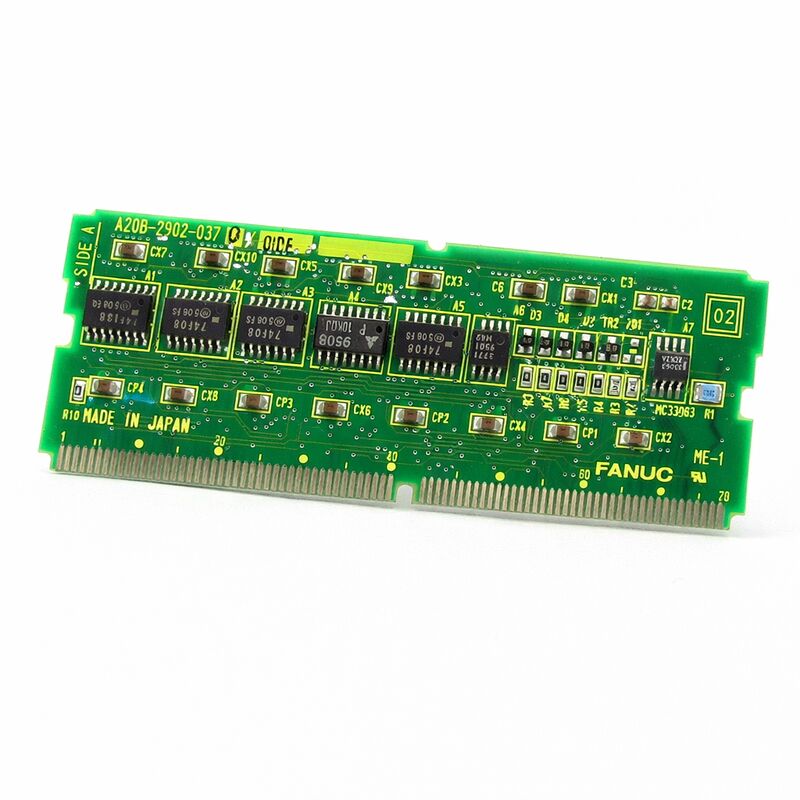
FANUC A20B-2902-0348 | Combined FROM / SRAM Memory Module — Series 16 / 18 / 21 CNC
Two Memory Types, Two Different Jobs
The A20B-2902-0348 integrates Flash ROM and battery-backed SRAM on a single SMD daughter board. Both are persistent storage — but they store completely different categories of data and fail through different mechanisms.
FROM (Flash ROM — non-volatile, no battery needed): Stores the CNC operating system, the PMC ladder program, and the machine builder's custom software. Flash retains data indefinitely without power. When the controller powers up, it loads the operating system from the FROM module. If the FROM content is corrupted or damaged, the controller cannot start. FROM failure typically appears as a checksum alarm at boot. A blank replacement module must have the correct software files loaded before the machine runs — these come from a backup or from the machine builder's documentation.
SRAM (battery-backed — loses content if battery dies): Stores the data that changes during normal machine use: CNC parameters, tool offset tables, work coordinate offsets. This data must survive each power cycle. The battery maintains a trickle current through the SRAM cells when the machine is off. When battery voltage falls below the retention threshold, all SRAM content is lost. Replace the battery with the controller powered on — replacing with power off risks SRAM content loss if the battery is marginal.
These two sections are electrically independent on the board. A FROM checksum alarm points to the FROM section; a parameter loss or low-battery alarm points to the SRAM section and battery.
Key Specifications
| Parameter |
Value |
| Part Number |
A20B-2902-0348 |
| FROM |
Flash ROM (non-volatile) |
| SRAM |
Battery-backed |
| Compatible |
Series 16, 18, 21 CNC |
| Type |
SMD plug-in daughter board |
| Origin |
Japan |
A20B-2902 Series — Exact Suffix Match Required
The A20B-2902 series contains a large number of FROM/SRAM module variants with different memory capacities and hardware configurations for different CNC platform generations. Some variants also include additional functions such as analog spindle interfaces. The -0348 is one specific variant in this family. Replacing it with a different suffix — even one that appears physically identical — risks a FROM capacity mismatch or hardware incompatibility that prevents correct controller operation. Always read the full part number from the installed board's label before sourcing.
FAQ
Q1: The controller shows a FROM checksum alarm at every power-on. Is this board the cause?
A persistent FROM checksum alarm at boot indicates corrupted or failed FROM content. First check whether an interrupted software update caused the corruption — a write that stopped mid-process corrupts the affected sector. If no update was in progress, the FROM hardware has failed and the module needs replacement. Have the correct FROM file set ready before starting the work.
Q2: The CNC shows a battery low alarm. How much time before SRAM data is lost?
The low battery alarm appears before the battery reaches the critical retention threshold — typically providing days to weeks of continued operation depending on battery age and cabinet temperature. Treat it as requiring action within days, not weeks. Replace the battery with the controller powered on so SRAM content is maintained during the swap.
Q3: A replacement A20B-2902-0348 has arrived. What should be checked before installation?
Confirm the replacement's full part number matches the installed module exactly, including any revision suffix. Verify the CNC data backup is complete and includes all parameters, tool offsets, work coordinates, and PMC ladder. Have the FROM file set ready for reload. Inspect the connector contacts on the replacement board for shipping damage before seating.
Q4: After data reload, one axis's servo parameters appear slightly different from backup values. Is this a problem?
Compare against a second backup copy or against the machine's documentation. A minor discrepancy can result from a backup captured mid-edit rather than from a stable state. If the restored parameters produce correct machine behaviour and the difference is numerically trivial, the values are likely correct. Verify axis performance under controlled conditions before returning to production.
Q5: The installed module is revision /02A but only /01A is available as a replacement. Are these interchangeable?
Minor hardware revision suffixes within the same base part number typically represent PCB layout changes or component substitutions that maintain the same functional specification. Later revisions are generally backward-compatible with earlier revision installations. If uncertainty exists for the specific application, confirm with the machine's maintenance documentation or a FANUC service resource before installing.


 Your message must be between 20-3,000 characters!