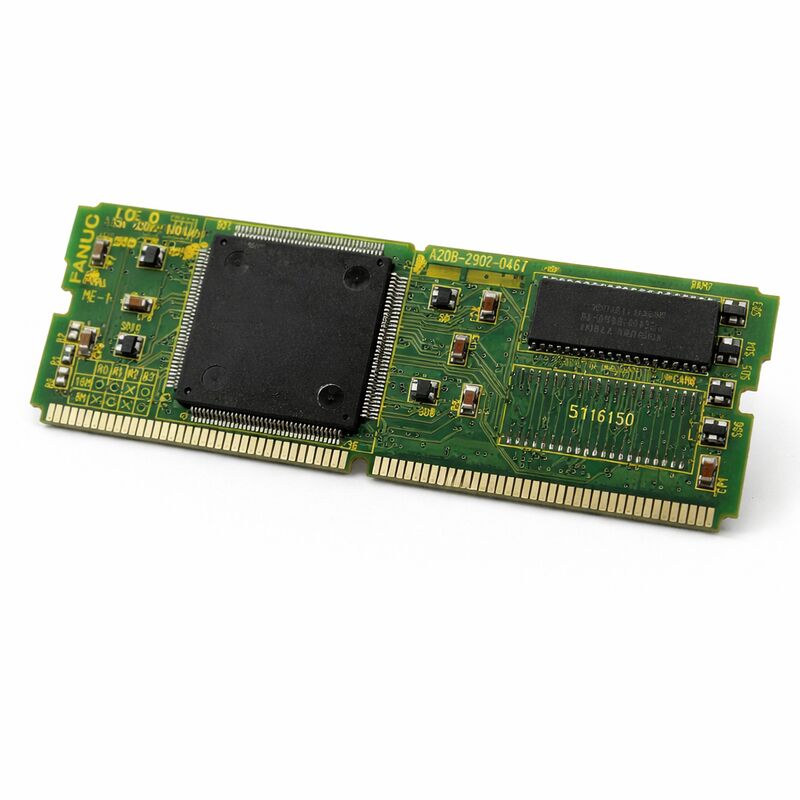
FANUC A20B-2902-0470 | Touch Panel Control Module PCB — CNC HMI Interface, Japan Origin
Part Number: A20B-2902-0470
Manufacturer: FANUC Corporation (Japan)
Product Type: Touch Panel Control Module PCB
Board Series: A20B-2902
Application: FANUC CNC Control Systems — Operator Interface
Overview
The A20B-2902-0470 is a touch panel control module PCB from FANUC's A20B-2902 series.
It integrates the touch sensing and control logic circuitry that enables operator interaction through a touchscreen interface in FANUC CNC control systems.
This board is the hardware layer that translates a finger contact on the display surface into a command that the CNC controller can act upon.
Touch panel interfaces in CNC machine tools serve a practical purpose beyond convenience.
An operator navigating complex menus, inputting parameters, or confirming operations at a touchscreen works faster than with a traditional keypad in many scenarios.
FANUC introduced touch panel capability to their CNC platforms to support this interaction style, and the A20B-2902-0470 is the PCB that makes it possible on the systems that use it.
The board communicates with the CNC control processor, passing touch event data that the CNC software interprets as operator commands.
The physical touch sensor — typically a resistive or capacitive overlay on the display — connects to this board.
The board's control logic detects the touch, processes the coordinate data, and forwards it to the CNC through its communication interface.
Key Specifications
| Parameter |
Value |
| Part Number |
A20B-2902-0470 |
| Manufacturer |
FANUC Corporation |
| Product Type |
Touch Panel Control Module PCB |
| Board Series |
A20B-2902 |
| Function |
Touch input sensing, signal processing, CNC communication |
| Interface |
Human-Machine Interface (HMI) — touch panel |
| Compatible Systems |
FANUC CNC control systems with touch panel displays |
| Application Examples |
FANUC 0i-MD VMC and compatible FANUC CNC platforms |
| Origin |
Japan |
| Operating Temperature |
0 – 55°C |
| Storage Temperature |
−20 – 60°C |
| Humidity |
75% RH max (non-condensing) |
| Condition Available |
New / Refurbished / Repaired |
Touch Panel Technology in CNC Environments
CNC machine tool environments place specific demands on any interface component.
Vibration from the machine structure, temperature variation from the machining process and from thermal cycling in the enclosure, coolant mist, and the general contamination of an active workshop all affect equipment durability.
A touch panel PCB for CNC use must operate reliably in these conditions, not just in controlled laboratory settings.
The A20B-2902-0470 is designed for this environment. FANUC's CNC components are engineered for industrial duty — consistent operation at the temperature extremes of a working cabinet, resistance to the electrical noise generated by servo drives and spindle amplifiers sharing the same enclosure, and reliable performance over the long service intervals typical of CNC machine tools.
The touch interface supplements or replaces keypad inputs on the operator panel. In CNC systems where touch capability is provided, the touch panel covers functions that would otherwise require navigation through keypad menus. Parameter input, screen navigation, and soft key function activation can all be handled through the touch surface.
The A20B-2902-0470 is the hardware that supports all of these interactions.
Signal Path — Touch to CNC
When an operator touches the display surface, the touch sensor detects the contact.
The sensor generates a signal corresponding to the touch coordinates.
This signal reaches the A20B-2902-0470 touch panel control module PCB, which processes the raw sensor data into a usable coordinate value.
The board communicates the processed touch data to the CNC control processor.
The CNC software maps the touch coordinates to the display interface elements visible on the screen at that moment.
The appropriate function is activated — the same function that would have been activated by pressing the corresponding physical key if one were present.
This path must be reliable and fast enough that the operator experiences no perceptible lag between touch and response.
Industrial HMI design targets response times that maintain the natural feel of direct interaction.
Lag or missed touches undermine confidence in the interface and slow operator workflow. The A20B-2902-0470 is designed to meet these response requirements in its supported systems.
Fault Identification — Touch Panel PCB vs. Display Faults
When a touch panel interface becomes unresponsive or erratic, the fault can originate in several places: the touch sensor overlay itself, the cable connecting the sensor to the control board, the A20B-2902-0470 PCB, or the CNC software configuration for the touch interface.
Diagnosing which component is responsible before ordering parts avoids unnecessary spending.
A completely unresponsive touch panel with all other display functions normal points to the PCB or its connection path.
An erratic or drifting touch response — touches registering in incorrect positions — is more often the touch sensor overlay itself aging or sustaining physical damage.
Visible damage to the display surface (scratches, deformation, moisture ingress) should redirect the diagnosis to the sensor overlay rather than the control PCB.
Confirm cable connections from the touch sensor to the A20B-2902-0470 before concluding the board has failed.
Vibration in the machine environment loosens connectors gradually.
A connector that was secure at installation may develop intermittent contact years later.
FAQ
Q1: The touch panel was working correctly and stopped responding entirely after a CNC software update. Could the A20B-2902-0470 have been damaged by the update?
A software update does not damage PCBs. If the touch panel stopped responding after an update, the more likely cause is a configuration parameter for the touch interface that changed or was reset during the update process.
Check the CNC's touch panel configuration settings and confirm they match the previous setup.
If parameters are correct and touch remains non-functional, then investigate the hardware.
Q2: Only part of the touch surface responds. The upper right area of the screen produces no touch response. Is this the PCB or the sensor?
Partial failure across a defined region of the touch surface is more characteristic of a sensor overlay fault than a PCB fault.
The PCB processes signals from the entire sensor — a PCB fault typically produces total failure or erratic behaviour across the whole surface rather than a zone-specific dead area.
Inspect the overlay for physical damage in the non-responsive region.
Q3: The touch panel PCB was replaced. Touch is now responding, but touches are consistently offset from the intended target. What causes this?
Touch offset after a replacement indicates the touch panel requires calibration for the installed display.
The calibration procedure maps the touch sensor coordinate space to the display pixel coordinates.
If calibration was not performed after installation, or if the calibration data from the previous board does not apply correctly to the new one, offset touch response is the expected result.
Run the touch calibration procedure from the CNC's diagnostic or setup menu.
Q4: How does coolant contamination affect the touch panel and this PCB?
Coolant on the display surface temporarily disrupts capacitive touch response and can cause erratic touches on resistive touch surfaces.
Coolant that penetrates the display assembly and reaches the touch sensor cable connectors creates a conduction path that produces persistent false touch signals.
Coolant reaching the A20B-2902-0470 PCB itself can cause short circuits on the board.
Confirm the operator panel enclosure sealing is intact and replace any damaged gaskets or seals before addressing touch panel hardware faults caused by contamination.
Q5: Can the A20B-2902-0470 be repaired if only one component on the board has failed?
Component-level repair is viable when the failed component can be identified and sourced.
Common single-component failures on HMI interface boards include damaged input protection devices from electrostatic discharge, failed connector contacts, and degraded decoupling capacitors.
Faults in proprietary FANUC interface ICs are generally not repairable at the component level.
A skilled technician familiar with FANUC HMI boards can assess repairability after inspection.


 Your message must be between 20-3,000 characters!