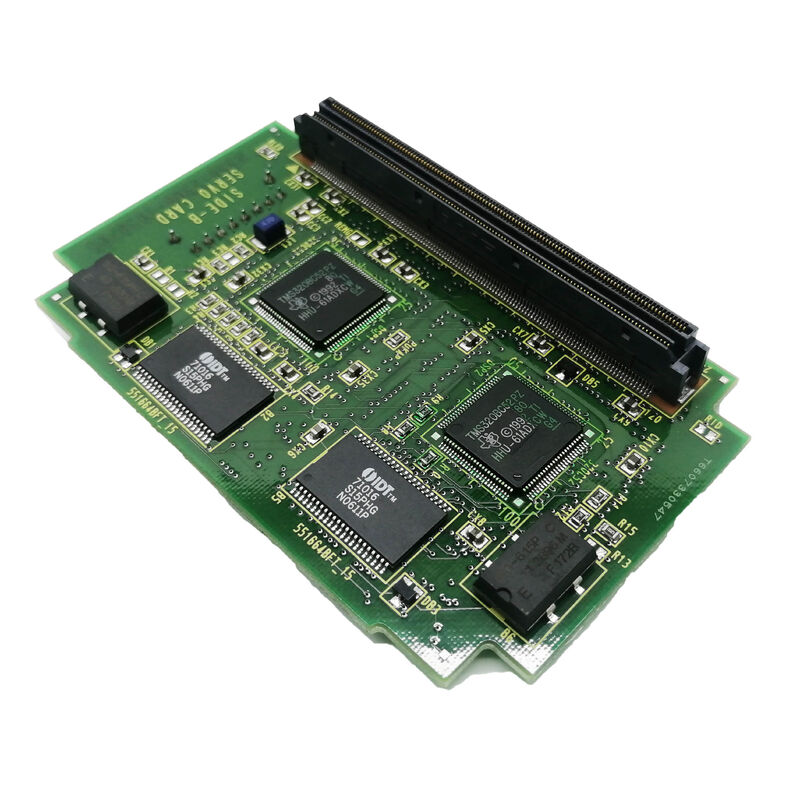
A20B-3300-0084 | FANUC R-J3 Robot Controller CPU Card — 8MB SDRAM / Horizontal Mount / A16B-3200-0330 / A16B-3200-0331
R-J3 Robot Controller — What the CPU Card Does
The FANUC R-J3 is a robot controller designed for FANUC industrial robots across a range of models and payloads. Inside the R-J3 cabinet, the main PCB (A16B-3200-0330 or A16B-3200-0331) hosts the controller's central processing and memory system. The A20B-3300-0084 CPU card is an option card that installs horizontally on this main PCB, providing 8MB of SDRAM for the controller's processing operations.
In the R-J3 system, this SDRAM serves as the working memory for the robot's real-time processing tasks: motion interpolation for all robot joints simultaneously, programme execution from the teach pendant, I/O signal processing, and communication management between the controller and connected devices. SDRAM's fast read/write cycle time allows the controller's CPU to access data at the speed required for the robot's motion control update rate.
Key Specifications
| Parameter | Value |
|---|
| Memory | 8MB SDRAM |
| Application | FANUC R-J3 robot controller |
| Compatible Main PCBs | A16B-3200-0330 / A16B-3200-0331 |
| Installation | Horizontal mount on main PCB |
| Alternate | A20B-3300-0085 (16MB) |
| Slot Type | CPU card option |
8MB vs 16MB — Choosing the Right Capacity
The R-J3 controller accommodates two CPU card options:
A20B-3300-0084 — 8MB SDRAM: The standard capacity option. 8MB is sufficient for the R-J3's base software, typical robot programmes, and normal I/O configuration. This is the correct replacement for an existing 8MB card installation.
A20B-3300-0085 — 16MB SDRAM: The expanded capacity option. 16MB supports larger robot programme libraries, more complex I/O signal configurations, or extended process monitoring functions that require additional memory allocation.
Always match the replacement card's memory size to the original installed card. Installing an 8MB card in a system configured for 16MB may cause the controller to alarm on startup if the memory size does not match the system's configuration parameters.
Application Scenarios
R-J3 controller CPU card failure: A FANUC robot running an R-J3 controller develops memory-related alarms during programme execution. After isolating the fault to the A20B-3300-0084 CPU card, the replacement card is fitted horizontally on the A16B-3200-0330 main PCB. The controller resumes normal operation after power cycling.
Robot controller preventive maintenance: A production facility running multiple FANUC R-J3 robot controllers schedules periodic controller maintenance. A20B-3300-0084 cards are included in the maintenance programme — replaced at defined intervals to prevent age-related SDRAM failures on high-duty-cycle robot systems.
R-J3 controller rebuild: An older R-J3 controller is rebuilt for recommissioning. The A20B-3300-0084 CPU card is replaced as part of the full board refresh, alongside the main PCB and FROM/SRAM memory modules.
FAQ
Q1: Does the A20B-3300-0084 replacement require robot programme reloading?
The A20B-3300-0084 is SDRAM — volatile memory that does not retain data without power. The robot programmes are stored in the R-J3's non-volatile FROM (Flash Read-Only Memory) module, not in the SDRAM card. Replacing the A20B-3300-0084 does not erase robot programmes. However, always back up all robot programmes, system variables, and mastering data before performing any card replacement. After fitting the replacement, the controller reloads the runtime environment from FROM on startup.
Q2: Is the A20B-3300-0084 compatible with all R-J3 controller variants?
The A20B-3300-0084 is confirmed for use with R-J3 main PCBs A16B-3200-0330 and A16B-3200-0331. Other R-J3 or R-J2 variants may use different main PCBs with different CPU card interface specifications. Verify the main PCB part number from the installed controller before ordering the replacement CPU card.
Q3: What is the consequence of running an R-J3 controller without the A20B-3300-0084 installed?
The A20B-3300-0084 provides the SDRAM working memory required for the controller's CPU operation. Without this card, the R-J3 controller will not start up correctly — it will alarm or halt during the boot sequence, as the CPU cannot allocate sufficient working memory for the robot software. The card is a required component, not an optional enhancement.
Q4: How is the A20B-3300-0084 physically secured after installation?
The card connects to the main PCB via its edge connector and is retained mechanically to prevent vibration-induced loosening. The retention method depends on the specific main PCB revision — some use a screw-down bracket, others a plastic clip. After fitting the card, verify the retention hardware is correctly engaged before powering the controller. A loose card that makes intermittent contact during robot operation causes unpredictable controller alarms and potentially dangerous robot behaviour.
Q5: Can the A20B-3300-0084 (8MB) be replaced with the A20B-3300-0085 (16MB) as an upgrade?
In principle, a higher-capacity SDRAM card can be installed if the main PCB and controller software support the larger memory size. However, this should only be done after confirming with FANUC documentation or service support that the installed R-J3 controller version can address 16MB of SDRAM. Installing an unsupported memory size can cause startup alarms. If the controller has always used 8MB and 8MB is the documented maximum for that configuration, replace with A20B-3300-0084 only.


 Your message must be between 20-3,000 characters!