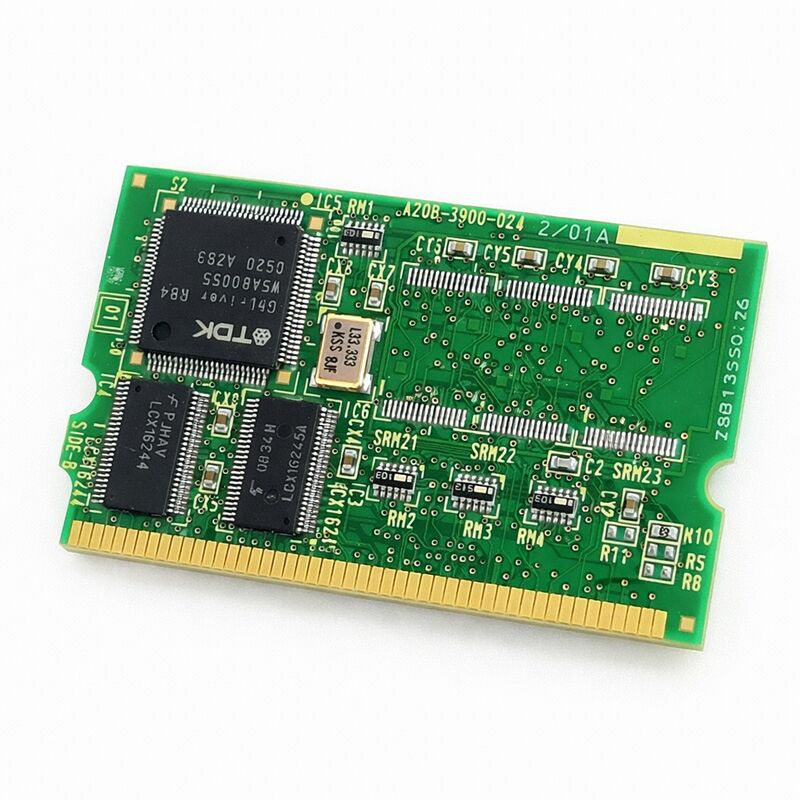
FANUC A20B-3900-0240 | 128 MB FROM / 1 MB SRAM Module B1 — Genuine FANUC, Japan Origin
Part Number: A20B-3900-0240
Manufacturer: FANUC Corporation (Japan)
Product Type: FROM / SRAM Memory Module (PCB)
Designation: Module B1
Overview
The A20B-3900-0240 is FANUC's 128 MB FROM / 1 MB SRAM module, designated as the B1 variant in the A20B-3900 series.
It sits at the high end of the FANUC memory module range in terms of FROM capacity — 128 megabytes of Flash ROM is a significant step up from the 16 MB and 32 MB modules used on smaller control platforms.
This capacity reflects the scale of the systems this module supports: large FANUC CNC controllers and robot controllers that run complex software configurations with heavy option loading.
FROM holds the controller's entire software stack non-volatilely. Every power cycle, the system reads the FROM contents and loads them into working memory. The FROM on this module never loses its contents through a power interruption — that is the fundamental nature of Flash ROM.
It does, however, require the correct software content. A blank or incorrectly loaded module will not run the controller.
This is why reinstalling FROM files after board replacement is a mandatory step, not an optional one.
The 1 MB SRAM on this module is battery-backed volatile memory. It holds data that the controller generates during operation: active parameters, runtime variables, and other state information that must survive short power interruptions but is maintained by the backup battery during full power-off. SRAM capacity of 1 MB suits systems with moderate parameter sets.
Where a larger parameter store is required, the B2 variant (A20B-3900-0241, with 2 MB SRAM) serves that need.
Key Specifications
| Parameter |
Value |
| Part Number |
A20B-3900-0240 |
| Manufacturer |
FANUC Corporation |
| Product Type |
FROM / SRAM Memory Module (PCB) |
| Designation |
Module B1 |
| Board Series |
A20B-3900 |
| FROM Capacity |
128 MB (Flash ROM, non-volatile) |
| SRAM Capacity |
1 MB (battery-backed, volatile) |
| Installation |
Plug-in module, controller main board |
| Application |
FANUC CNC and robot controller systems |
| Post-Installation |
Full FROM files, parameters, and programs reload required |
| Origin |
Japan |
| Operating Temperature |
0 – 55°C |
| Storage Temperature |
−20 – 60°C |
| Humidity |
75% RH max (non-condensing) |
| Condition Available |
New / Refurbished / Repaired |
FROM Capacity — Why 128 MB Matters
The jump from 32 MB or 64 MB to 128 MB FROM is not arbitrary. FANUC CNC systems accumulate software content over time.
Base system software takes a portion of the FROM.
Each option loaded onto the controller — macro executor, conversational programming functions, additional language packages, custom cycles, expanded PMC capacity — consumes more FROM space. Robot systems load robot software, vision libraries, force control packages, and other application-specific software.
A controller running a basic configuration runs comfortably on 32 MB or 64 MB.
A controller with many options, a large PMC ladder, and extensive user software pushes toward and beyond those limits.
The A20B-3900-0240's 128 MB FROM eliminates this constraint. It is the module for fully loaded control configurations where smaller FROM capacities would be insufficient.
Data Reload Requirement
Installing a new A20B-3900-0240 installs a blank module. No software, no parameters, no programs. Everything must be reloaded before the machine or robot can operate.
This is not a trivial step.
FROM files must be loaded using the appropriate FANUC boot procedure. CNC parameters must be restored from a parameter backup.
PMC ladder programs must be reloaded. User programs, tool data, and any other stored data must be restored.
Each category of data uses a different restore path. The sequence matters. Complete the software installation before parameter loading, and confirm software integrity before loading parameters.
The backup that feeds this restore must be current and complete. An outdated backup restores an outdated system state.
A partial backup leaves gaps that require manual re-entry. Maintaining a verified, complete backup — updated after any system change — is the only way to make a board replacement straightforward.
B1 vs. B2 — Choosing the Right Variant
The A20B-3900 series designations B1 and B2 indicate the SRAM capacity. B1 modules carry 1 MB SRAM. B2 modules carry 2 MB SRAM.
The FROM capacity — 128 MB in this case — is the same. The difference shows up in how much volatile parameter storage is available.
Most FANUC CNC systems run comfortably on 1 MB SRAM. Some configurations — particularly those with very large parameter sets, extensive tool life management data, or large numbers of stored programs — benefit from the additional 1 MB offered by the B2 variant.
The controller documentation or the original module's label confirms which variant was factory-fitted. That determines which replacement is correct.
FAQ
Q1: The controller will not boot after installing the A20B-3900-0240. What is the most likely cause?
The FROM contents are blank on a new module. The controller requires valid system software in FROM to boot.
Access the FANUC boot screen (hold specific keys during power-up — procedure varies by controller model) and load the system software via memory card or USB. Once software is loaded, the controller should boot normally.
Q2: Is the A20B-3900-0240 interchangeable with the A20B-3900-0241 (B2)?
They share the same 128 MB FROM capacity. The difference is SRAM: B1 has 1 MB, B2 has 2 MB.
A B2 can often substitute for a B1 without issue — more SRAM does not cause problems. A B1 substituting for a B2 may cause issues if the system was configured to use the full 2 MB SRAM capacity.
Verify the requirement from the controller documentation before substituting.
Q3: What data must be reloaded after replacing the A20B-3900-0240?
All FROM files (system software, option software, PMC ladder), all CNC parameters, all stored programs, and any user data.
Each has a separate load path. Complete the software installation first, then parameters, then programs.
Do not skip the software step — parameters loaded without correct software may generate alarms or fail to load correctly.
Q4: The SRAM backup battery is dead. Is the board still usable?
The FROM portion is intact regardless of battery condition — it is non-volatile.
The SRAM portion will have lost its contents during any power-off event after the battery failed. Replace the battery and reload all SRAM-resident data.
The board itself is functional; only the SRAM data requires restoration.
Q5: How should the A20B-3900-0240 be handled during installation?
Use anti-static precautions throughout. Ground yourself before touching the board.
Handle by edges only — avoid touching circuit traces or chips. Install and remove with power off.
Confirm the module is fully seated in its connector after installation — a partially seated module may cause intermittent faults rather than a clean failure, making diagnosis difficult.


 Your message must be between 20-3,000 characters!