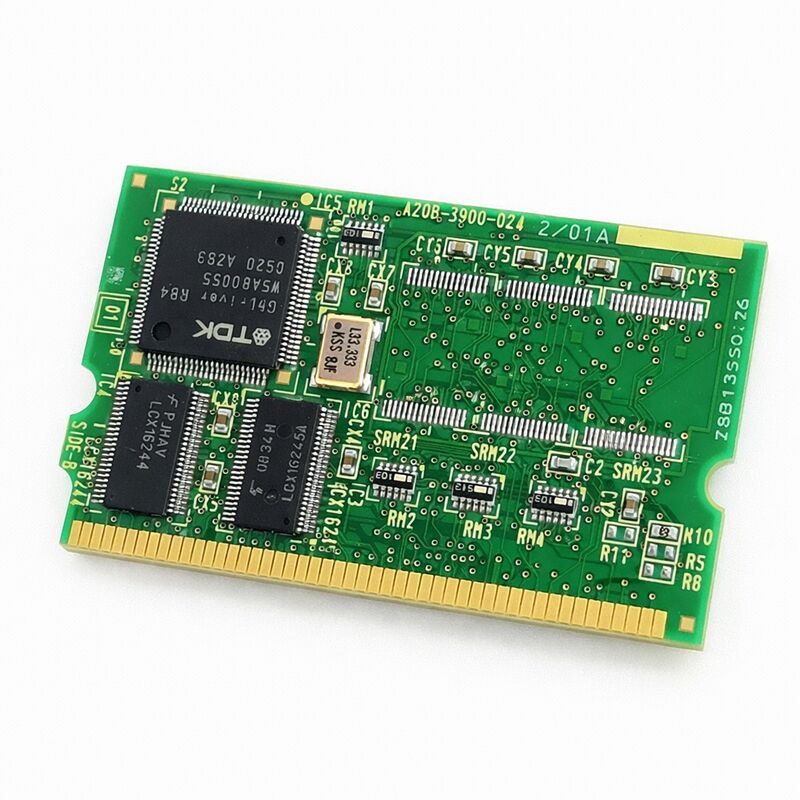
FANUC A20B-3900-0242 | SRAM Memory Module — A20B-3900 Series, Japan Origin
Part Number: A20B-3900-0242
Manufacturer: FANUC Corporation (Japan)
Product Type: SRAM Memory Module (PCB)
Board Series: A20B-3900
Compatible Systems: FANUC CNC control systems
Overview
The A20B-3900-0242 is an SRAM memory module from FANUC's A20B-3900 series. SRAM — Static Random Access Memory — is the battery-backed volatile memory at the heart of every FANUC CNC controller's active data storage.
It holds the information that makes each machine a specific machine: part programs, tool offset tables, parameter settings, workpiece coordinate data, and macro variable values. This data must survive power-off events. The backup battery on the module keeps the SRAM contents intact for years between machine power cycles.
The A20B-3900 series represents FANUC's later-generation memory module family.
These modules deliver higher capacity and improved integration compared to earlier FANUC memory architectures.
The -0242 variant provides the SRAM allocation appropriate for its designated controller platform.
When this module fails — or when its backup battery depletes and goes unreplaced — the SRAM contents are lost on the next power-off.
The controller powers back on with blank memory. It alarms immediately. All machine-specific data must be restored from backup before the machine can produce parts again.
Key Specifications
| Parameter |
Value |
| Part Number |
A20B-3900-0242 |
| Manufacturer |
FANUC Corporation |
| Product Type |
SRAM Memory Module |
| Board Series |
A20B-3900 |
| Memory Type |
SRAM (battery-backed volatile) |
| Compatible Systems |
FANUC CNC control systems |
| Battery Backup |
Yes — SRAM data retained through power-off |
| Origin |
Japan |
| Operating Temperature |
0 – 55°C |
| Storage Temperature |
−20 – 60°C |
| Humidity |
75% RH max (non-condensing) |
| Condition Available |
New / Refurbished / Repaired |
What SRAM Holds — And Why It Matters
Every program the operator enters lives in SRAM. Every tool length and radius offset lives in SRAM. Every CNC parameter that defines how the machine moves — feed rate limits, acceleration times, servo tuning values, I/O assignments — lives in SRAM.
The machine's operational identity is entirely contained in this memory.
This is not the same as the system software. System software lives in FROM (Flash ROM) — a separate, non-volatile storage that does not need a battery and does not change during normal machine use. SRAM is the working memory layer above FROM.
It is where the factory-specific, machine-specific, and job-specific data resides.
Losing SRAM does not break the CNC hardware.
The electronics are fine. But without SRAM data, the controller has no configuration. It does not know the machine's travel limits, its tool library, or which programs to run. Everything must be re-entered or restored from a backup file before the machine is usable again.
This makes the backup practice — and the condition of the backup battery — critically important maintenance concerns.
Battery Backup — The Essential Maintenance Item
The SRAM on this module is powered by a dedicated backup battery when the machine is switched off.
The battery is a finite resource. It has a typical service life that varies with storage conditions but generally spans several years in normal machine service.
When the battery voltage drops below the SRAM holding threshold, data is lost the next time the machine is powered off.
The FANUC controller issues a low-battery alarm before the battery reaches the failure point.
That alarm is the replacement signal. Do not ignore it, do not dismiss it without replacing the battery, and do not power off the machine before the replacement is made. Once the alarm appears, the window for safe replacement is open — but it is finite.
Battery replacement with power on is the correct procedure on most FANUC systems.
This keeps the SRAM contents live during the swap. Verify the machine's maintenance documentation for the correct procedure before starting.
Data Backup — Before Any Module Work
Any memory module work begins with a data backup. Full parameter backup, program backup, tool data backup, macro variable backup — every category of SRAM data should be captured to a memory card or external storage before the module is touched.
A backup taken five minutes before a module swap is worth far more than one taken six months ago if anything changes.
The FANUC controller's boot screen provides the backup tools.
So does the BOOT function available on most controllers. Format a memory card, initiate the backup, verify that the files are present and non-zero in size, then proceed with the module work.
FAQ
Q1: The controller shows an SRAM parity alarm on power-up. What does this mean and what should be checked first?
An SRAM parity alarm indicates the controller detected corrupted data in SRAM — the stored content does not match its error-checking values. First check the backup battery voltage. A depleted battery is the most common cause.
If the battery is weak, replace it and restore from backup. If the battery is good, the module itself may have a hardware fault and should be replaced after confirming a backup is available.
Q2: The battery alarm appeared. How urgently does it need to be addressed?
Address it before the next planned power-off of the machine. The alarm appears while the battery still has enough charge to maintain SRAM — but that margin narrows over time. Schedule the replacement within the current shift or the next maintenance window at the latest.
Do not plan an overnight shutdown without first replacing the battery or taking a fresh backup.
Q3: After SRAM module replacement, the machine alarms with "PARAMETER ENABLE" and all parameters appear to be zero. What happened?
A new module installs blank. All SRAM data — parameters, programs, offsets — is absent. This is expected. Restore the full parameter set from backup using the boot screen's restore function.
If no recent backup exists, the parameters must be re-entered manually from the machine documentation or from a parameter printout.
Never run a machine without verifying parameter correctness after a memory module replacement.
Q4: Can SRAM modules from the A20B-3900 series be interchanged between different part number variants?
Different variants in the A20B-3900 SRAM module family carry different capacity allocations and may be matched to different controller platforms. Interchangeability is not guaranteed between suffix variants.
Always match the replacement module's exact part number to the one being removed.
A capacity mismatch can cause the controller to alarm or behave unpredictably after installation.
Q5: How long can a removed A20B-3900-0242 retain its data in storage?
Without an active power source, the module's own battery maintains the SRAM data during storage.
A healthy battery in a stored module holds data for years. However, the battery drains during storage just as it does in service — just more slowly if the storage temperature is low.
If a module is being stored as a pre-loaded spare, check its battery condition before relying on it for a swap.
A module with a good battery and recent backup data is a valuable spare; one with a depleted battery is just hardware.


 Your message must be between 20-3,000 characters!