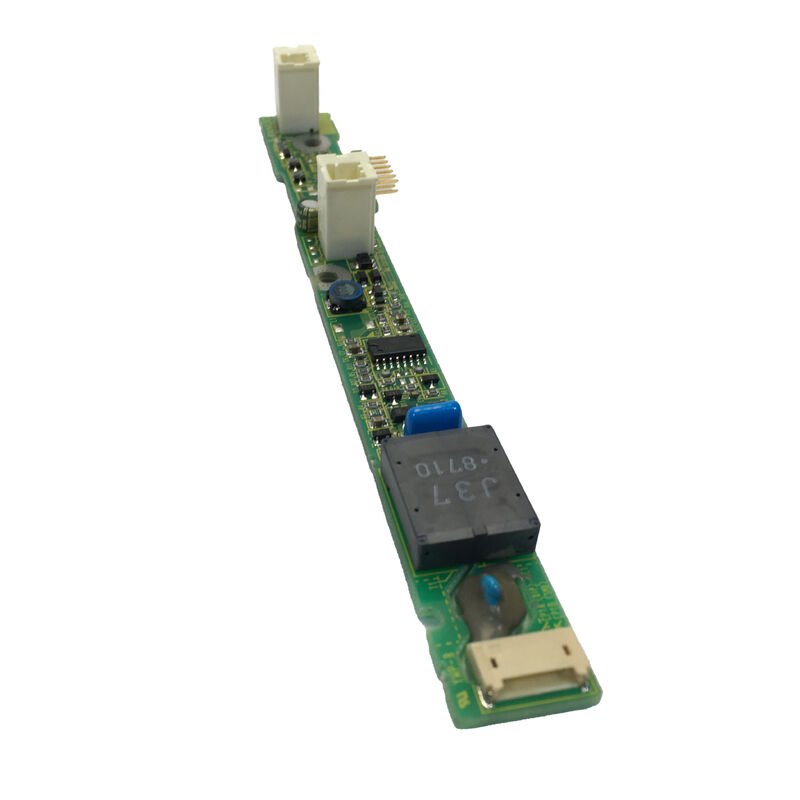
FANUC A20B-8002-0703 8.4-Inch Color LCD Inverter for CNC Display Systems
Product Introduction
The FANUC A20B-8002-0703 is an 8.4-inch color LCD inverter designed for display-related applications where stable screen illumination and dependable visual performance are essential. As part of the A20B-8002 series, this unit is positioned as a dedicated display support component rather than a general-purpose control board, making it especially relevant in service and replacement work for FANUC interface systems.
In practical machine operation, the inverter section plays a highly specific role.
A display can still have an intact LCD panel and functioning control logic, yet remain unreadable if the backlight power stage is unstable or has failed.
That is why inverter boards are often a key checkpoint in troubleshooting dark, dim, or intermittent CNC display faults.
The A20B-8002-0703 addresses this part of the display chain by supporting the illumination function required for a clear and usable screen.
For maintenance teams, the value of this model lies in focused compatibility, functional simplicity, and its usefulness in restoring normal display readability without replacing a larger part of the operator interface assembly.
In long-running machine installations, that makes it a practical spare for display repair workflows.
Parameter information
| Parameter |
Officially Verified Data |
| Part Number |
A20B-8002-0703 |
| Board Type |
Inverter |
| Display Type |
8.4-inch color LCD |
| Hardware Section |
LCD-mounted type CNC hardware |
| Mounting Location |
Inside the cover |
| Related Display Unit |
8.4-inch color LCD/MDI unit |
| Related LCD ID |
1011 |
Key Application Value
- Designed for 8.4-inch color LCD display systems
- Supports stable backlight and screen visibility
- Useful for display repair and replacement work
- Suitable for maintenance of FANUC screen assemblies
- Practical for industrial service inventory
Where It Fits in the Display System
Unlike the LCD panel itself, the inverter does not create the image. Its job is to support the lighting side of the display assembly. In field service, this distinction matters.
A machine may still be operating normally in the background while the display appears black or too dark to read. In many cases, the issue is not the control processor or the LCD panel, but the inverter stage that powers screen illumination.
That makes the A20B-8002-0703 a targeted replacement component for display-related faults where preserving the original screen structure is preferable to changing the full interface assembly.
FAQ
Q1: What is the main function of the A20B-8002-0703?
The A20B-8002-0703 functions as an LCD inverter for an 8.4-inch color display system. In industrial use, that means it supports the backlight power section needed for the screen to remain visible.
If the inverter is not working correctly, the display may appear dark, unreadable, or unstable even though the machine itself is still powered and responsive.
Q2: How is an inverter board different from the LCD panel?
The LCD panel is the image-bearing display surface, while the inverter supports the illumination side of the screen assembly. A faulty inverter can make a healthy LCD panel appear failed.
For that reason, experienced technicians separate screen problems into panel faults, inverter faults, cable issues, and main-board faults rather than replacing the display assembly blindly.
Q3: What symptoms usually suggest inverter trouble?
Typical symptoms include a black screen with the control still active, a dim display, flickering brightness, or a screen that lights briefly at startup and then fades.
In CNC service work, these signs often indicate that the backlight power stage should be inspected before the LCD panel or main control board is condemned.
Q4: Why is exact model matching important for LCD inverter boards?
Because inverter boards are tied to the electrical and physical requirements of specific screen assemblies. Even if two boards appear similar, they may differ in connector layout, display size suitability, or power characteristics.
In industrial maintenance, matching the original model helps reduce the risk of unstable brightness, premature failure, or installation mismatch.
Q5: What should be checked before replacing this inverter?
Technicians should confirm the exact part number, inspect harnesses and connectors, examine the LCD panel condition, and check whether the cabinet has signs of heat stress or contamination.
It is also good practice to verify that the screen problem is not caused by upstream power issues, since a failing supply condition can sometimes produce similar symptoms.


 Your message must be between 20-3,000 characters!