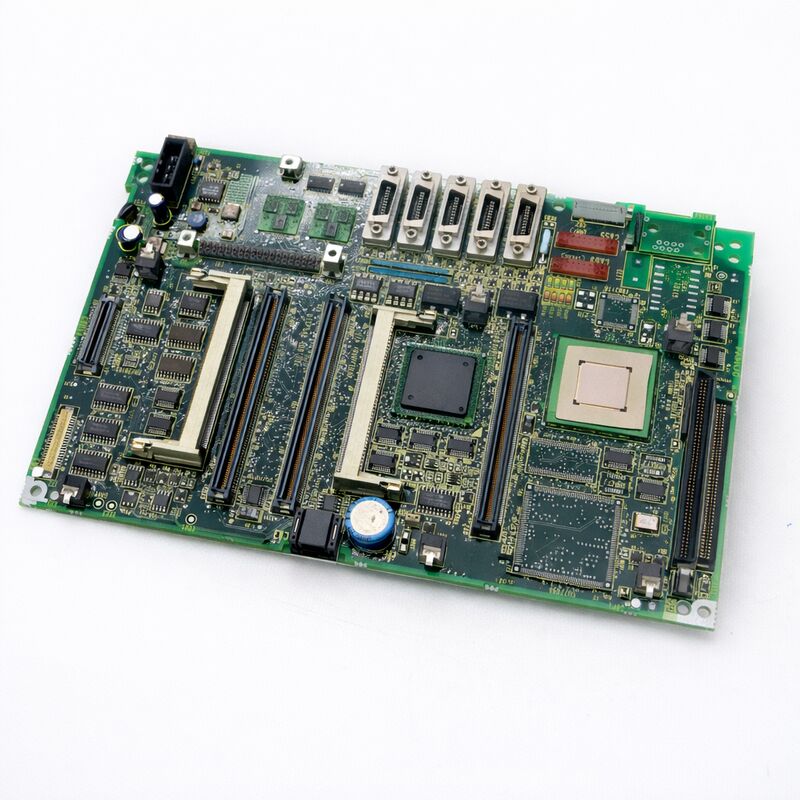
FANUC A20B-8100-0620 | LCD Control PCB — CNC Operator Panel Display Control Board, A20B-8100 Series, Japan Origin
Part Number: A20B-8100-0620
Manufacturer: FANUC Corporation (Japan)
Product Category: PCB — LCD Control Board (Operator Panel Display Circuit)
Series: A20B-8100
Overview
The FANUC A20B-8100-0620 is an LCD control printed circuit board from FANUC's A20B-8100 series.
It sits within the CNC operator panel assembly and handles the display control circuitry for the LCD unit — the board responsible for translating the CNC's video output signals into the correct drive signals that the LCD panel requires to produce a stable, accurate image.
The operator panel is where the machinist and the machine tool meet. Everything the CNC needs to communicate — axis positions, spindle speed, programme status, alarm messages, parameter values — is conveyed through the display. A failed LCD control board breaks this visual link completely.
The CNC continues to run internally, but the operator loses all feedback. On a running machine this is a production stop; on a machine being set up, it makes any meaningful operation impossible.
The A20B-8100-0620 belongs to FANUC's A20B-8100 series, a broad family of control PCBs covering main boards, option boards, and operator panel electronics for i-series and related CNC generations. Within this family, the LCD control board is the interface layer between the CNC's graphics output and the physical display panel — not the main CNC motherboard itself, but a dedicated board in the operator panel housing that manages the display signal chain.
Key Specifications
| Parameter |
Value |
| Board Function |
LCD display control circuit |
| Architecture |
Operator panel PCB |
| Series |
A20B-8100 |
| Application |
FANUC CNC operator panel LCD unit |
| Compatible Systems |
FANUC i-series CNC operator panels |
| Status |
Available — refurbished, tested |
| Origin |
Japan |
LCD Control Board Function in the Operator Panel
A FANUC CNC operator panel is more than just an enclosure with a screen and buttons. Inside, multiple circuit boards divide up the functions. The main CNC board (in an integrated LCD-mounted system) or the display interface (in a standalone system) generates video signals.
Those signals travel to the LCD control board, which performs several critical tasks:
Signal conversion and timing. The LCD panel requires specific digital drive signals with precise timing.
The control board converts the incoming video signal format into the horizontal and vertical timing and pixel data format the LCD panel's driver ICs require.
Backlight drive control. LCD panels require a backlight to illuminate the liquid crystal layer from behind.
Earlier FANUC panels used CCFL (cold cathode fluorescent lamp) backlights driven by an inverter stage; later panels use LED backlights.
The LCD control board contains or interfaces with the backlight drive circuitry that regulates brightness and controls backlight enable/disable.
Display power management. The control board manages the power sequencing for the display panel itself — controlling when panel power is applied relative to the signal input, which prevents damage to the LCD panel from power-on transients.
Signal integrity. In the industrial environment of a machine tool — with servo drives switching, coolant pumps cycling, and motors starting — electrical noise is a constant challenge.
The LCD control board maintains signal integrity through filtering and buffering to keep the display image stable despite the electrically noisy surroundings.
Symptoms of LCD Control Board Failure
LCD control board problems are usually visually obvious but can be gradual:
Complete blank screen with power applied and no backlight visible points to either the board or the backlight supply. Test whether the CNC is running normally in other respects (check via RS-232C or listen for normal operation sounds) before replacing the board.
Image present but washed out or incorrectly coloured suggests the display signal chain is working but the contrast or colour control circuitry on the board has partially failed.
Display flickers intermittently and then stabilises typically indicates a failing component on the control board — often related to aging capacitors or a backlight supply that is marginal.
Screen freezes while CNC continues running (verified by the machine continuing to respond to inputs) points to a display control board failure rather than a main board failure.
FAQ
Q1: The display is completely blank but the CNC appears to be running. How can the LCD control board be confirmed as the fault?
First verify the CNC is operational despite the blank screen — try an RS-232C connection or observe whether the machine accepts MDI input by sound.
If the CNC is running normally, the fault is in the display chain rather than the main board.
Measure whether DC power is reaching the LCD control board through its connector. If power is present but the screen remains blank, the board itself or the backlight supply is the next point to check.
A known-good spare board swapped in temporarily confirms or rules out the A20B-8100-0620.
Q2: Can an LCD panel be replaced separately from the A20B-8100-0620 control board?
The LCD panel and its control board are closely matched components in FANUC operator panel assemblies.
FANUC sells them as matched pairs through its spare parts programme. In field service, it is generally advisable to replace the control board and panel together unless confident of matching compatibility.
If only the LCD panel has physically failed (cracked screen, dead pixels) while the control board tests good, a matched replacement panel from the same operator panel assembly generation is required.
Q3: After replacing the A20B-8100-0620, the image appears but has incorrect colours or contrast. What should be adjusted?
Some FANUC LCD control boards have brightness and contrast adjustments accessible via trim pots on the board or via CNC parameter settings.
After board replacement, check whether the relevant CNC parameters for display brightness are set correctly.
If the image remains incorrect after parameter checks, the replacement board may require initial configuration using FANUC's display adjustment procedure.
Also verify that the replacement board's revision is compatible with the specific LCD panel installed.
Q4: The display works when cold but fails after the machine has run for 30 minutes. Is this a symptom of LCD control board failure?
Thermal failure is a classic symptom of aging electrolytic capacitors on the control board.
Capacitors that test acceptable at room temperature may fail at operating temperature.
This symptom is a strong indicator of a control board that needs replacement rather than repair, as the faulty capacitor on a densely populated board can be difficult to isolate without specialist equipment. Board replacement is the practical solution.
Q5: Is SRAM data backup needed before replacing the A20B-8100-0620?
No. The LCD control board is a pure display circuit — it holds no machine parameters, programmes, or configuration data. SRAM data is stored on the CNC's main board memory modules.
Replacing the A20B-8100-0620 does not risk any data loss. Simply power down, swap the board, reconnect all cables carefully, and power up normally.


 Your message must be between 20-3,000 characters!