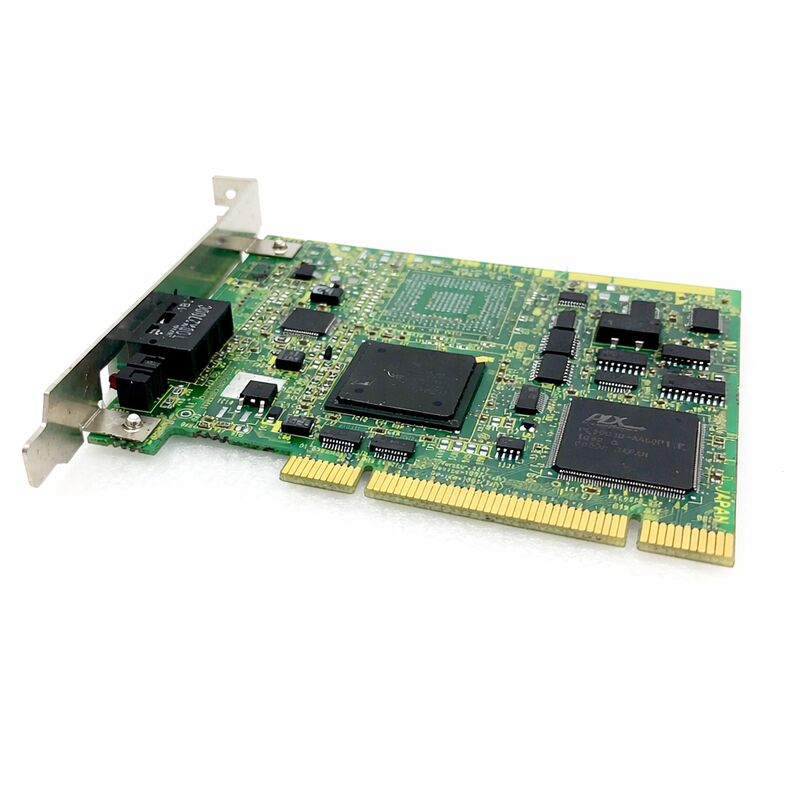
FANUC A20B-8101-0160 | PC-Side HSSB Interface PCB — High-Speed Serial Bus, Optical Fiber CNC-to-PC Link, For Series 16i / 18i / 21i / 160i / 180i / 210i, A20B-8101 Series, Japan Origin
Part Number: A20B-8101-0160
Manufacturer: FANUC Corporation (Japan)
Product Category: PCB — PC-Side HSSB Interface Board (High-Speed Serial Bus)
Series: A20B-8101 — FANUC i-series PC interface PCB family
Overview
The FANUC A20B-8101-0160 is the PC-side component of FANUC's High-Speed Serial Bus (HSSB) link — the board that installs in a personal computer's expansion slot to connect that PC directly to a FANUC i-series CNC controller via optical fibre cable.
It is the half of the HSSB pair that belongs to the computer, not the CNC.
HSSB was FANUC's proprietary solution for a specific problem that arose in the late 1990s when CNC machines began to benefit from PC-based applications: how to create a high-bandwidth, noise-immune communication link between a FANUC CNC controller and a host personal computer located nearby.
Standard serial connections (RS-232C) were too slow and too susceptible to electromagnetic interference from machine drives.
Ethernet was available but brought latency and protocol overhead that made it unsuitable for applications requiring fast, deterministic access to the CNC's internal data.
HSSB addressed both problems.
The optical fibre physical medium eliminates electromagnetic susceptibility entirely — light signals cannot be induced by electrical noise, regardless of how close the cable runs to servo amplifiers, spindle drives, or power contactors.
The proprietary high-speed serial protocol provides faster data throughput than RS-232C and lower latency than Ethernet for direct CNC memory access.
The resulting link allowed the PC to access the CNC's internal memory — programmes, parameters, current positions, spindle speeds, PMC data — at speeds fast enough to support real-time monitoring applications, operator guidance screens driven from the PC, and large file transfers.
Key Specifications
| Parameter |
Value |
| Board Type |
PC-side HSSB interface (installs in PC expansion slot) |
| Compatible CNC |
FANUC Series 16i/18i/21i, 160i/180i/210i, 150i, Power Mate i-D/H |
| Physical Medium |
Optical fibre (COP7 connector) |
| CNC-side Interface |
CNC HSSB interface board (CNC-side) |
| Recommended Cable |
FANUC optical fibre cable A66L-6001-0026 series |
| Operating Temperature |
0°C to +55°C |
| Series |
A20B-8101 |
| Status |
Available — refurbished, tested |
| Origin |
Japan |
How HSSB Works — The Two-Board Architecture
The HSSB link always requires two boards: one in the CNC and one in the PC. The A20B-8101-0160 is the PC-side board.
The CNC-side board (a separate A20B-8100 or A20B-8001 series part) installs in an option slot of the CNC's basic unit.
CNC-side board: Connects to the CNC's internal F-BUS. Provides a COP7 optical fibre port. From the CNC's perspective, the HSSB link creates a shared memory area that the PC can access via the FANUC CNC Screen Display function driver.
PC-side board (A20B-8101-0160): Installs in the PC's expansion slot. Provides the matching COP7 optical fibre port on the PC side. FANUC's HSSB driver (installed on the PC's Windows operating system) communicates with the CNC through this board.
Applications written using the FANUC FOCAS library access the CNC through the driver.
The optical fibre cable connects the two COP7 ports.
The cable runs from the PC to the CNC — typically from a panel PC or industrial computer in the machine cabinet, through a cable duct, to the option slot position in the CNC control unit. Maximum cable length depends on the specific optical fibre cable model used.
PC and Software Requirements
The A20B-8101-0160 requires:
PC expansion slot. The board installs in an ISA or PCI expansion slot depending on the specific board variant. The PC must have a free compatible slot. Industrial panel PCs integrated into the machine cabinet are a common host for this board — they provide the physical mounting, the required expansion slot, and the industrial-grade operating environment needed for a board that stays in a machine tool cabinet.
FANUC HSSB driver. The driver for the PC's Windows operating system must be installed for the board to function.
The driver appears as an HSSB device in the Windows device manager. FANUC HSSB driver software supports Windows NT, Windows 2000, Windows XP, and subsequent Windows versions depending on the software version.
FANUC FOCAS library or CNC Screen Display function. Applications communicate with the CNC using FANUC's FOCAS2 library (for programmatic access to CNC data via PC application code) or the FANUC CNC Screen Display function (which mirrors the CNC operator panel display on the PC screen and allows operators to interact with the CNC from the PC).
Optical fibre cable. FANUC optical fibre cable A66L-6001-0026 series is recommended.
The cable length must be confirmed to be within the supported range for the specific cable model.
Optical Fibre — The Engineering Choice
The optical fibre physical medium is not an arbitrary choice — it is the engineering solution to a genuine problem in machine tool environments.
A machine tool cabinet contains multiple sources of intense electromagnetic interference: servo drive PWM switching at kilohertz frequencies, spindle drive power stages, AC contactors opening and closing under load, and transformer magnetic fields.
Any conventional electrical signal cable running through this environment picks up induced noise that corrupts data.
Optical fibre is immune by physics: it carries light, not electrical current. No electrical field can induce a signal in a fibre optic cable.
The HSSB link using optical fibre is reliably noise-free regardless of the electromagnetic environment it runs through.
This reliability is why FANUC chose optical fibre for HSSB rather than a conventional electrical serial connection.
The COP7 connector on the A20B-8101-0160 accepts the optical fibre cable. Keeping the fibre connectors clean is important for reliable operation — even small contamination on the fibre end face attenuates the optical signal, causing communication errors.
When the fibre is not connected, the protective cap must cover the COP7 port to prevent contamination.
FAQ
Q1: The HSSB link works but the PC shows intermittent communication errors. What is the most likely cause?
Optical fibre connector contamination is the most common cause of intermittent HSSB communication errors when the link was previously working. Remove the fibre cable from both COP7 connectors (on the A20B-8101-0160 board and on the CNC-side board) and inspect the fibre end faces.
Clean with a dry lint-free optical cleaning wipe or a proper fibre cleaning tool. Do not use solvents.
Reinsert the cable and confirm the connectors are fully seated and latched. If errors persist after cleaning, inspect the fibre cable for sharp bends or physical damage.
Q2: The PC with the A20B-8101-0160 installed is running Windows XP. Is the HSSB driver compatible?
FANUC HSSB driver software supports Windows XP. Install the correct driver version for the specific operating system — the driver version must match both the operating system and the specific HSSB board hardware revision. The HSSB driver appears in Windows Device Manager after installation.
If the device shows an error code, verify the driver version against FANUC's compatibility documentation for the A20B-8101-0160 hardware revision.
Confirm also that the PC's expansion slot type (PCI or ISA) matches the board's connection type.
Q3: Is it possible to connect one PC (with A20B-8101-0160) to multiple CNC machines simultaneously?
Yes, if the PC has multiple expansion slots available. Each HSSB link to one CNC requires one PC-side board and one optical fibre cable to the corresponding CNC-side board. Multiple A20B-8101-0160 boards can be installed in the same PC, each connecting to a different CNC.
The FANUC HSSB driver supports multiple HSSB channels — each channel is associated with one board and one CNC.
FANUC FOCAS applications can address each CNC by its channel number, allowing one PC to monitor, program, or display data from multiple CNC machines simultaneously.
Q4: What is the maximum optical fibre cable length supported by the HSSB link?
The recommended optical fibre cable (A66L-6001-0026 series) is available in standard lengths. The maximum supported cable length is determined by the optical power budget of the specific transmitter/receiver combination on the boards.
In practice, the HSSB link is intended for connections within a machine cabinet or between a machine cabinet and an adjacent panel — typically metres to tens of metres.
For longer runs, consult FANUC's HSSB documentation for the maximum cable length for the specific board and cable combination.
Do not route the cable in coils or with sharp bends, as these attenuate the signal.
Q5: After installing the A20B-8101-0160 and the FANUC driver, the CNC Screen Display function shows "CNC is not connected" or "HSSB error." What should be diagnosed?
Work through the following sequence:
(1) Confirm the driver is installed correctly and the A20B-8101-0160 shows no error in Windows Device Manager.
(2) Confirm the CNC-side HSSB board is installed in the CNC and the CNC is powered on.
(3) Confirm the optical fibre cable is connected and clean at both ends.
(4) Confirm the CNC's HSSB parameter (enabling HSSB communication on the CNC side) is set correctly — this parameter must be enabled for the CNC to participate in the HSSB link. (5) Confirm the node number configured in the PC's HSSB software matches the CNC's HSSB node setting.
A mismatch in node numbers is a common commissioning error that produces exactly the "not connected" symptom.


 Your message must be between 20-3,000 characters!