logo
Send Message
Guangzhou Sande Electric Co.,Ltd.
Email Sales01@sande-elec.com TEL: 86--18620505228
Home > Products > CNC Circuit Board >
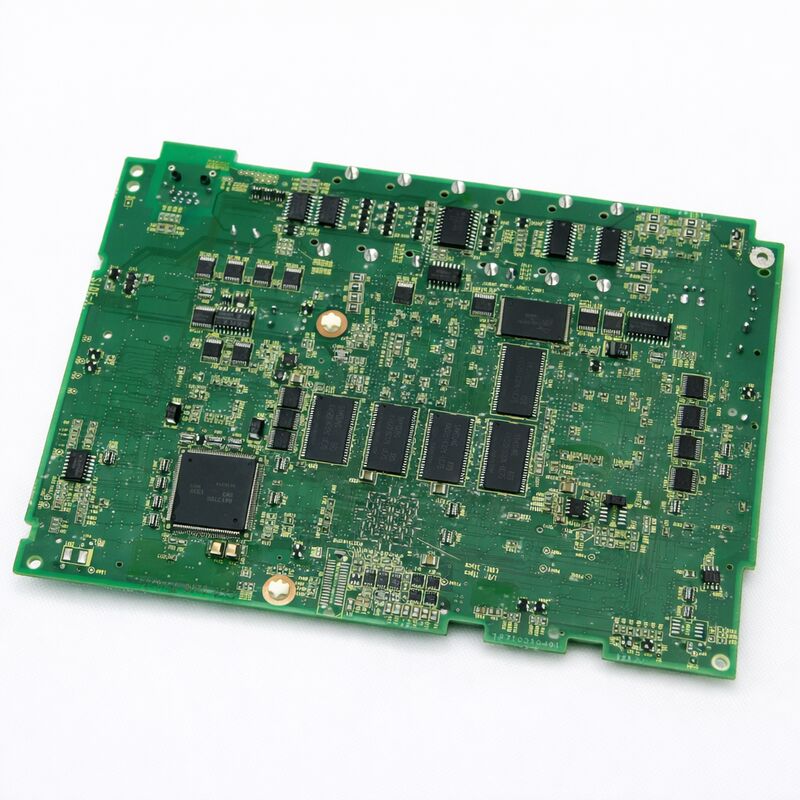
A20B-8200-0541 Fanuc PCB Board A20B82000541 A2OB-82OO-O54I
  • A20B-8200-0541 Fanuc PCB Board A20B82000541 A2OB-82OO-O54I

A20B-8200-0541 Fanuc PCB Board A20B82000541 A2OB-82OO-O54I

Place of Origin JAPAN
Brand Name FANUC
Certification CE ROHS
Model Number A20B-8200-0541
Product Details
Condition:
NEW / USED
Item No.:
A20B-8200-0541
Origin:
JAPAN
Certificate:
CE
Highlight: 

a20b fanuc pcb board

,

a20b cnc circuit board

,

pcb cnc circuit board

Payment & Shipping Terms
Minimum Order Quantity
1 pcs
Packaging Details
Original packing
Delivery Time
0-3 days
Payment Terms
T/T,PayPal,Western Union
Supply Ability
100 pcs/day
Product Description
A20B-8200-0541 Fanuc PCB Board A20B82000541 A2OB-82OO-O54I
FANUC A20B-8200-0541 | Series 0i-D Main PCB A1
Central Control Board for 0i-TD / 0i-MD CNC Controllers, A20B-8200 Series, Japan Origin

Overview
The FANUC A20B-8200-0541 is the A1-generation main board for Series 0i-D CNC controllers. The 0i-D is FANUC's mainstream mid-tier CNC system designed for production machine tools that comprise the largest segment of the global installed CNC base. This includes lathes with two or three axes, machining centers with three or four axes, compact turn-mill centers, and standalone grinders.
The A1 designation represents the original hardware generation of the 0i-D main board. FANUC introduced subsequent A3 and A5 hardware revisions as component improvements became available. From a software perspective, all hardware revisions run the same 0i-D software and produce identical CNC behavior. For spare parts replacement, the A1 board is the appropriate choice for machines originally fitted with A1 hardware.

Key Specifications
Compatible CNC FANUC Series 0i-D (0i-MD, 0i-TD)
Hardware Revision A1
Servo Interface FSSB (Fibre-optic Serial Servo Bus)
Spindle Interface Serial spindle (JA7x)
Network Embedded Ethernet
I/O Bus I/O Link
Plug-In Modules Axis card, FROM/SRAM, option cards
SRAM Backup Required Yes — before replacement
Status Available — refurbished, tested
Origin Japan

0i-D Architecture — What the Main Board Manages
The 0i-D utilizes an integrated-board architecture that consolidates nearly all control functions on a single main board, unlike earlier FANUC generations that distributed functions across multiple boards in large racks.
  • FSSB Servo Communication: The main board's optical FSSB circuit communicates with all servo amplifiers via high-speed fibre-optic serial links, carrying position commands, velocity commands, and feedback data for each servo axis simultaneously.
  • Serial Spindle Interface: The spindle amplifier communicates with the main board through a serial spindle link (JA7A connector), transmitting speed commands, spindle orientation requests, and feedback data.
  • Embedded Ethernet: Integrated Ethernet port supports DNC operations, MTConnect connectivity, and CNC Web Server functions without requiring separate communication cards.
  • I/O Link: Manages machine tool I/O including limit switches, tool setters, door interlock signals, and coolant controls through the I/O Link serial bus connected to distributed I/O modules.

Replacement Procedure — Key Steps
  1. SRAM Backup: Before board removal, back up all SRAM data through the CNC boot screen, capturing parameters, PMC ladder program, tool offset data, work coordinate systems, and stored part programs.
  2. Module Inventory: Document all plug-in modules installed on the original board (axis control card, FROM/SRAM module, option modules) for transfer to the replacement board.
  3. Physical Swap: Power down, wait for capacitor discharge, ground yourself, remove modules from original board, install them on replacement board, then install the replacement board.
  4. SRAM Restore: Power up in boot mode and load the SRAM backup from memory card or PC, confirming successful data loading.
  5. Functional Verification: Power to normal operation and verify all axes respond, spindle readiness, PMC execution, and correct I/O states.

Frequently Asked Questions
Q1: After replacing the A20B-8200-0541, the CNC shows a "900 series" system alarm at startup. What does this mean?
900-series system alarms typically indicate hardware configuration errors after main board replacement. Check that plug-in modules are fully seated and attempt the SRAM restore procedure again from boot mode. If the alarm persists, reference the specific alarm number in the FANUC Series 0i-D Maintenance Manual (B-64305EN).
Q2: Can the A20B-8200-0541 (A1 revision) be replaced with a later A3 or A5 revision main board?
Later hardware revisions (A20B-8200-0847 for A3, A20B-8200-0849 for A5) are functionally compatible replacements for the A1 board in 0i-D machines. The SRAM data backup and restore procedure remains identical. Confirm compatibility with your parts supplier regarding the specific revision and machine control unit/software version.
Q3: The 0i-D machine shows "FSSB alarm" immediately after the main board was replaced. All servo amplifiers are powered. What should be checked?
FSSB alarms after board replacement typically indicate disconnected or contaminated FSSB optical fibre connections. Inspect each FSSB fibre connection at both main board (COP10A connectors) and amplifier ends, ensuring full insertion and proper latching. Clean fibre ends with dry lint-free cloth if contamination is visible.
Q4: This is an 0i-TD (turning) machine. Does the A20B-8200-0541 work for both 0i-TD and 0i-MD configurations?
The A20B-8200-0541 main board hardware is common to both 0i-TD and 0i-MD configurations. The functional difference lies in the CNC control software stored in the FROM module and parameter settings in SRAM. Ensure the FROM/SRAM module carries the correct configuration software for your application.
Q5: How long does the full SRAM backup and restore process take for a typical 0i-D machine?
For typical production machines with moderate-size PMC and several stored programs, backup operations take 3-10 minutes and restore operations take similar duration. Data verification adds 5-15 minutes. Total backup/restore time typically ranges from 20-40 minutes for prepared technicians using known-good memory cards.

Contact Us at Any Time

+86 18620505228
10/F,Jia Yue Building, Chebei Road,Tianhe district,Guangzhou,China
Send your inquiry directly to us