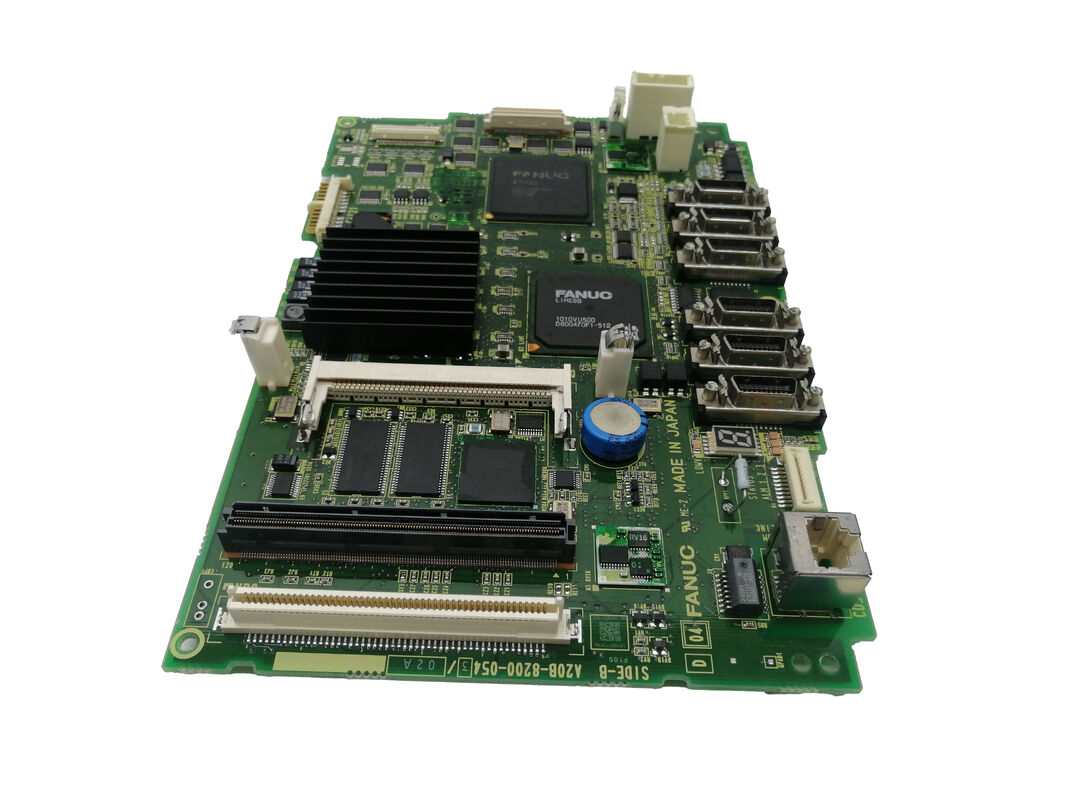
FANUC A20B-8200-0849 | Series 0i-D Main PCB A5 — Latest Hardware Revision for 0i-MD / 0i-TD CNC Controllers, A20B-8200 Series, Japan Origin
Part Number: A20B-8200-0849
Manufacturer: FANUC Corporation (Japan)
Product Category: PCB — Main CPU Board (Motherboard)
Series: A20B-8200 — FANUC Series 0i-D CNC main control PCB family
Overview
The FANUC A20B-8200-0849 is the A5 hardware revision of the main board for FANUC Series 0i-D CNC controllers. Within the A20B-8200 main board family, the 0i-D generation went through successive hardware revision levels as FANUC updated component specifications and improved board reliability over the product's lifetime.
The A1 revision (A20B-8200-0541) was the original.
The A3 followed (A20B-8200-0847). The A5 (A20B-8200-0849) is the most current revision in the 0i-D main board line, incorporating the latest component selections while maintaining complete functional compatibility with the 0i-D CNC software.
The 0i-D is FANUC's volume mainstream CNC — the controller behind hundreds of thousands of lathes, machining centres, grinders, and multi-function machine tools produced by major machine tool builders throughout the 2000s and 2010s.
Every 0i-D machine, regardless of whether it runs a two-axis lathe or a four-axis machining centre, depends on its main board to execute the CNC system software, communicate with servo amplifiers via FSSB, control the spindle via serial interface, manage machine I/O through I/O Link, and drive the operator panel display.
The A5 board performs all of these functions identically to the earlier A1 and A3 revisions.
From the machine's software perspective, no difference is visible between hardware revisions. For the maintenance engineer, the A5's significance is practical: when sourcing a replacement main board for an 0i-D machine, the A5 is the current revision available and the appropriate replacement for any earlier 0i-D main board revision.
Key Specifications
| Parameter |
Value |
| Compatible CNC |
FANUC Series 0i-D (0i-MD, 0i-TD) |
| Hardware Revision |
A5 (latest in 0i-D main board series) |
| Servo Interface |
FSSB (Fibre-optic Serial Servo Bus) |
| Spindle Interface |
Serial spindle (JA7x connectors) |
| Network |
Embedded Ethernet |
| I/O Bus |
I/O Link (JD51A) |
| Plug-In Modules |
Axis card, FROM/SRAM module, option cards |
| Replaces |
A20B-8200-0541 (A1), A20B-8200-0847 (A3) |
| SRAM Backup Required |
Yes — mandatory before replacement |
| Status |
Available — refurbished, tested |
| Origin |
Japan |
Hardware Revisions in the 0i-D Main Board Family
Understanding the A20B-8200 main board revision sequence helps with both procurement and fault diagnosis.
A1 revision (A20B-8200-0541): The original 0i-D main board hardware. Found in 0i-D machines produced during the early years of this controller generation.
A3 revision (A20B-8200-0847): The second generation hardware update. Component changes improved thermal performance and long-term reliability.
A5 revision (A20B-8200-0849): The current hardware generation. Represents FANUC's latest component selection for the 0i-D platform. The A5 is the recommended replacement for all earlier 0i-D main board revisions.
In all three cases, the CNC software loaded in the FROM module is identical, and machine parameters in SRAM are directly compatible.
An A5 board installed in a machine originally fitted with an A1 board, with the same FROM/SRAM modules and parameters, behaves exactly like the original hardware from the machine's control software perspective.
What the 0i-D Main Board Controls
The main board is the most consequential single component in the 0i-D controller. It manages:
FSSB servo communication. All servo amplifiers — whether driving X, Y, Z, or rotary axes — communicate with the main board through the FSSB optical fibre bus. Position commands, velocity feedback, and servo alarm data all travel on this link.
A failed FSSB circuit on the main board produces immediate axis alarm codes at power-up.
Serial spindle. The spindle amplifier (Alpha i SPM or Beta i SPM) receives speed commands and position data through the serial spindle interface (JA7A connector).
Spindle orientation, rigid tapping synchronisation, and Cs-axis control all depend on this link.
I/O Link. Machine I/O — limit switches, door interlocks, tool setters, coolant controls, pallet changers — connects via the I/O Link serial bus terminated at JD51A on the main board.
The I/O Link chain extends to distributed I/O modules around the machine.
Embedded Ethernet. The 0i-D's built-in Ethernet port (for DNC operation, MTConnect data collection, or FOCAS2 remote monitoring) is integrated on the main board.
No separate communication option card is needed for standard Ethernet connectivity.
Operator panel and display. The main board drives the MDI keyboard interface and the CNC's display output through its display connector, supporting the 7.2-inch and 8.4-inch LCD units commonly fitted to 0i-D machines.
Replacement Procedure
The A20B-8200-0849 replacement follows FANUC's standard 0i-D main board procedure:
Step 1 — SRAM backup. Before removing the board, execute a full backup through the CNC boot screen. Save to FANUC memory card or PC via RS-232C.
The backup captures all parameters, PMC ladder, tool data, work coordinates, and stored part programmes.
Step 2 — Module inventory. Note which plug-in modules are on the original board.
These modules — axis control card, FROM/SRAM module, any option cards — transfer to the new A5 board.
Step 3 — Physical swap. Power down, wait for capacitor discharge, remove modules from the original board, install them on the A5 board, install the A5 board.
Step 4 — SRAM restore. Boot in boot mode, load the SRAM backup from the backup medium. Confirm all data is present.
Step 5 — Functional check. Normal power-up, verify all axes ready, spindle ready, PMC executing, I/O states correct.
FAQ
Q1: An 0i-D machine has the original A1 main board (A20B-8200-0541). Can the A5 (A20B-8200-0849) replace it directly?
Yes. The A5 is the current replacement for all earlier 0i-D main board revisions. All plug-in modules from the A1 board install directly on the A5 board.
The SRAM data backed up from the A1 machine restores without modification to the A5 board.
After restoration, the machine operates identically.
Q2: After installing the A20B-8200-0849, the CNC shows "SR" alarm at startup. What does this indicate?
SR-series alarms at first startup after main board replacement indicate SRAM data issues — either the restore was incomplete, the backup file is corrupted, or the restore process was interrupted. Re-attempt the SRAM restore from the boot menu.
If the backup file is confirmed good and the restore completes without error, the SR alarm should clear. If no backup was taken before the board was removed, SRAM contents will be at factory defaults and all machine-specific parameters must be re-entered.
Q3: The FSSB alarm appears immediately after the A20B-8200-0849 was installed, even though all servo amplifiers are powered. What should be checked first?
The most common cause of FSSB alarms immediately after a main board replacement is a disturbed FSSB optical fibre cable. During board handling, the fibre cables at the COP10A connectors on the main board may have been pulled loose or contaminated at the fibre end face.
Inspect each FSSB fibre connection at the main board — confirm each is fully inserted and latched. Clean fibre end faces with a dry lint-free wipe if any contamination is visible.
Q4: Can the A20B-8200-0849 be used in an 0i-F machine?
No. The 0i-D (A20B-8200 main board family) and the 0i-F (a different main board family) are distinct controller generations with different hardware architectures.
The A20B-8200-0849 is specifically for the 0i-D generation. The 0i-F requires its own main board, which is not cross-compatible with 0i-D hardware.
Q5: How does the A5 hardware revision differ from the A1 in terms of the repair technician's perspective?
From a functional standpoint, there is no difference — the A5 runs the same software and interfaces with the same peripheral hardware in the same way as the A1.
From a physical standpoint, some connector positions, component placements, or minor board layout details may differ between revisions, so installation photographs from the original A1 board should not be used as the sole reference for the A5 installation — refer to the physical connectors and their labels on the A5 board itself.
Parameter and data compatibility is complete: no modifications to machine parameters are needed when replacing an A1 with an A5.


 Your message must be between 20-3,000 characters!