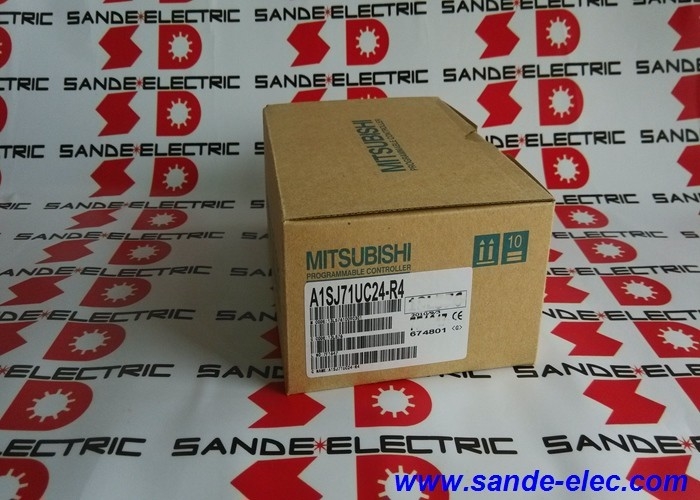
Mitsubishi A1SJ71UC24-R4 | MELSEC-A Computer Link Module — RS-422/RS-485 / 0.3–19.2kbps / 500m / 2-Piece Terminal Block
Serial Communication Between MELSEC-A CPU and External Devices
The A1SJ71UC24-R4 is a computer link module for Mitsubishi's MELSEC-A PLC platform — the module that adds an RS-422/RS-485 serial communication channel to the A-series rack. It enables the MELSEC-A CPU to exchange data with external devices: computers, HMI terminals, other PLCs, and intelligent field instruments that communicate via RS-422 or RS-485 serial links.
The module supports both computer link function and multi-drop link. Computer link connects the PLC directly to a host computer or SCADA system, allowing the computer to read and write PLC device data (registers, contacts, timers, counters) using Mitsubishi's dedicated protocol. Multi-drop link allows a single communication channel to serve multiple slave stations — up to 32 station addresses are supported on one RS-422/485 segment.
The U designation in A1SJ71UC24-R4 identifies the extended capability version. In addition to the standard computer link function, the UC24-R4 supports access to devices extended by AnACPU, AnUCPU, and A2US(H)CPU, and access to other MELSECNET/10 network stations via the connected CPU. This makes it compatible with a wider range of MELSEC-A CPU types than the base A1SJ71C24-R4.
Key Specifications
| Parameter |
Value |
| Part Number |
A1SJ71UC24-R4 |
| Interface |
RS-422 / RS-485 (1 channel) |
| Baud Rate |
0.3 to 19.2 kbps |
| Max Distance |
500 m |
| Station Addresses |
00 to 31 |
| Connection |
2-piece terminal block |
| Mounting |
Backplane / rack |
| Dimensions |
130 × 34.5 × 93.6 mm |
| Weight |
0.25 kg |
RS-422 and RS-485 — Terminal Resistors Required at Line Endpoints
When the A1SJ71UC24-R4 is the first or last station on an RS-422/485 bus segment, a terminal resistor must be connected across the receive and transmit differential pairs. The correct value depends on the wiring type:
- RS-422: 330Ω, 1/4W between RDA and RDB, and between SDA and SDB
- RS-485: 110Ω, 1/2W between RDA and RDB
Missing or incorrectly valued termination causes data communication errors, particularly at higher baud rates and longer cable runs. All devices on the same RS-422/485 segment must use the same communication standard — mixing RS-422 and RS-485 devices on one segment is not supported.
Station numbers are set using the station number switches on the module face, with a valid range of 00 to 31.
FAQ
Q1: What is the difference between A1SJ71UC24-R4 and A1SJ71C24-R4?
Both are MELSEC-A computer link modules with RS-422/RS-485 interface and the same physical dimensions. The UC24-R4 (U prefix) adds extended access capability: it can access devices from AnACPU, AnUCPU, and A2US(H)CPU, and supports communication to other MELSECNET/10 stations. For CPU types beyond the basic MELSEC-A range, the UC24-R4 is the compatible choice.
Q2: How many external devices can connect to one A1SJ71UC24-R4?
The module supports up to 32 station addresses (00 to 31) on a single RS-422/485 segment in multi-drop configurations. In practice, the number of devices is limited by the cable length (500m total segment), the baud rate selected, and the RS-485 receiver unit load capacity of the connected devices.
Q3: What transmission protocols does the A1SJ71UC24-R4 support?
The module supports full-duplex and half-duplex transmission, four dedicated communication protocols, no-protocol mode for generic serial communication, and bidirectional mode. Protocol selection is made via switches on the module. The no-protocol mode allows reading and writing raw serial data from the PLC ladder programme, enabling communication with devices that do not support Mitsubishi's dedicated protocol.
Q4: Can the A1SJ71UC24-R4 communicate with third-party devices that use RS-485?
Yes, using no-protocol mode or a compatible protocol variant. For Modbus RTU communication specifically, the A1SJ71UC24-R4-S2 variant is the appropriate choice — it adds dedicated Modbus RTU support. The base R4 module uses Mitsubishi's own dedicated protocol or no-protocol mode for custom serial exchanges.
Q5: What should be checked if the module shows communication errors after installation?
Verify that terminal resistors are fitted at the first and last stations on the RS-422/485 bus segment with the correct resistance value. Confirm all devices on the segment are wired consistently (all RS-422 or all RS-485). Verify station number settings match the programmed address assignments. Check cable shielding is grounded at one end only and that cable length does not exceed 500m.


 Your message must be between 20-3,000 characters!