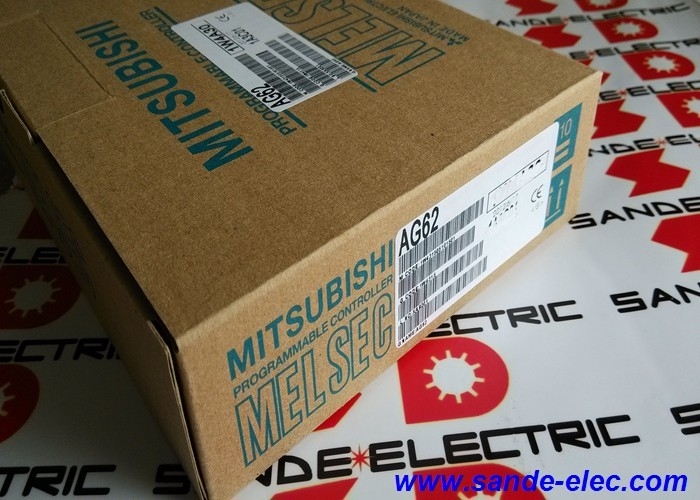
AG62 | Mitsubishi MELSEC-A Series Dummy Module — QA65B / QA68B Extension Base Unit / Slot Protection / M4 Fixing Screws
What a Dummy Module Does — and Why Empty Slots Need Protection
A MELSEC-A extension base unit provides multiple module slots that accept I/O modules, special function modules, and communication cards. In any given installation, it is unlikely that all slots in an extension base are filled — some slots remain empty, either because the initial installation doesn't require that capacity, or because space is reserved for future expansion.
An empty module slot exposes the backplane connector pins. Exposed connectors accumulate dust, conductive particles, moisture, and machining swarf in production environments. These contaminants can bridge contacts, degrade signal integrity on the bus, or cause intermittent faults that are difficult to trace back to the contamination source.
The AG62 dummy module fills empty slots with a solid, correctly-proportioned cover. It protects the connector and slot from environmental contamination without affecting the operation of installed modules. The bus continues to operate normally — the dummy module occupies the physical space but carries no electronics and draws no power.
Key Specifications
| Parameter |
Value |
| Product Type |
Dummy Module |
| Compatible Base |
QA65B, QA68B (extension base units) |
| Weight |
0.34 kg |
| Fixing Screws |
M4 |
| Tightening Torque |
78 to 118 N-cm |
| Waterproof |
No |
| Series |
MELSEC-A |
M4 Fixing Screws — Correct Torque Is Important
The AG62 secures to the base unit with M4 fixing screws, tightened to 78–118 N-cm. This torque range is not arbitrary — it is the range that:
- Provides sufficient clamping force to hold the dummy module firmly in the slot so it cannot rattle loose under vibration
- Avoids over-tightening that can strip the M4 thread in the base unit's mounting boss
Use a calibrated torque screwdriver set to the midpoint (approximately 100 N-cm) for consistent installation across multiple dummy modules. Under-tightened modules in high-vibration environments can work loose over time and fall into the base unit cavity.
Application Scenarios
New installation with partial I/O loading: A machine control system installs a QA68B extension base with four I/O modules, leaving four slots empty. Four AG62 dummy modules fill the remaining slots, protecting the connectors during machine operation in a metal-cutting environment where coolant mist and swarf are present.
Future expansion planning: An engineer plans to add analogue input modules to a MELSEC-A system in the next phase of a project. Current modules fill only part of the QA65B. AG62 dummy modules protect the reserved expansion slots until the second phase modules are ordered and installed.
Remote I/O rack protection: A remote I/O rack is positioned near a grinding machine. Even fully configured I/O racks sometimes have unused slots. AG62 modules protect these slots from grinding dust accumulation.
FAQ
Q1: Will the AG62 dummy module work on MELSEC-Q or MELSEC-iQ-R base units?
No. The AG62 is designed for the MELSEC-A series, specifically the QA65B and QA68B extension base units. MELSEC-Q and MELSEC-iQ-R base units use different module form factors, slot spacing, and connector configurations. Dummy modules for those platforms have separate part numbers specific to the Q and iQ-R series.
Q2: Does installing an AG62 affect the system's I/O addressing or programme?
No. The AG62 carries no electronics, draws no backplane current, and generates no bus signals. The PLC programme and I/O address configuration are unaffected by the presence or absence of dummy modules. The dummy module is purely a mechanical slot filler with no electrical function.
Q3: How many AG62 modules can be installed in one QA65B or QA68B base unit?
The maximum number of AG62 modules in a single base is equal to the total number of slots in that base minus the number of active I/O or function modules installed. All remaining empty slots should be fitted with AG62 dummy modules. There is no electrical limit on the number of dummy modules — they occupy slots without contributing to backplane bus loading.
Q4: Can the AG62 be used on the main CPU base unit rather than extension bases?
The AG62 is specified as an extension base unit dummy module. Confirm compatibility with the specific main base unit model before fitting — main base units and extension bases may differ in slot connector type or mounting dimensions. Use the spare parts or accessory list for the specific main base unit to identify the correct dummy module for that unit.
Q5: What is the correct tool for tightening the AG62 M4 fixing screws to the specified torque?
A standard #2 Phillips or JIS No. 2 cross-point screwdriver fits the M4 pan-head screws typically used on MELSEC-A modules. For repeatable torque application, use a torque screwdriver set to 100 N-cm (midpoint of the 78–118 N-cm range). A manual torque screwdriver suitable for M4 fasteners is the correct tool — electric screwdrivers without torque control should not be used, as they can over-tighten easily.


 Your message must be between 20-3,000 characters!