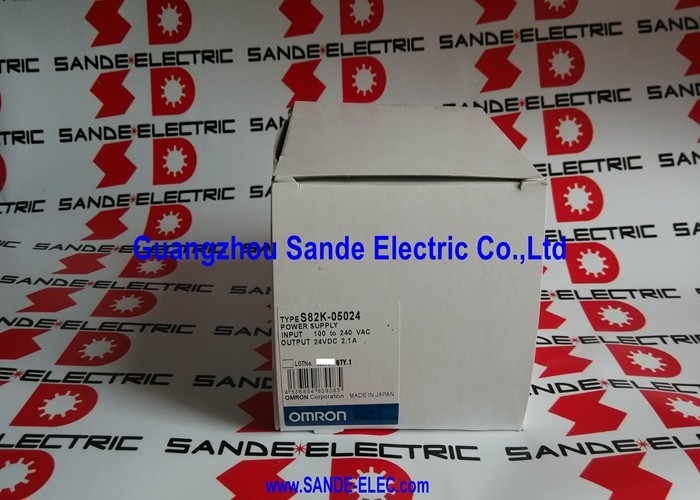
Omron S82K-05024 | S82K Series DIN Rail Switching Power Supply — 24V DC / 2.1A / 50W / 100–240V AC Auto-Select
50W at 24V DC — Universal AC Input, Adjustable Output
The S82K-05024 converts single-phase AC mains to a regulated 24V DC supply at 2.1A (50W) for powering PLC I/O cards, sensor networks, solenoid valve banks, and control panel loads that draw 24V DC. The wide-range AC input automatically handles 100–240V AC supply — the power supply works without range selection or link change on both 100–120V AC systems (North America, Japan) and 200–240V AC systems (Europe, industrial 230V). This universal input eliminates stocking separate 120V and 240V variants for different installation regions.
The output voltage is adjustable over the 21.6–27.6V DC range using the front-panel trimmer. This allows the output to be fine-tuned to compensate for voltage drop in long cable runs to distributed loads, or to set the output precisely for loads with tight voltage requirements. Remote sense capability (where supported) compensates for cable drop by measuring voltage at the load rather than at the supply terminals.
The DC LOW undervoltage alarm indicator is a practical commissioning and maintenance feature — the red LED illuminates when output voltage drops to 75–90% of rated, giving early warning of an overloaded or degraded supply before a complete supply failure.
Key Specifications
| Parameter |
Value |
| Input |
100–240V AC (auto-select), 85–264V AC range |
| Input Current |
1.3A @ 100V / 0.7A @ 240V |
| Output |
24V DC, 2.1A |
| Power Rating |
50W |
| Adjustable Output |
21.6–27.6V DC |
| Isolation |
3,000V |
| Efficiency |
~80% |
| Dimensions |
75 × 90 × 91 mm (H×W×D) |
| Mounting |
DIN rail / panel |
| DC LOW Indicator |
Yes (red LED at 75–90% of rated V) |
| Standards |
CE / cUL / UL / VDE |
| Status |
Discontinued |
Overload and Undervoltage Protection
The S82K-05024 includes an overload protection circuit — when output current exceeds the rated 2.1A, the protection activates to prevent thermal damage. Overload protection mode in the S82K series typically reduces output voltage or shuts down the supply until the overload condition is cleared. Note that loads with built-in DC-DC converters can present a high inrush current at startup that may activate the overload protection transiently — Omron's documentation addresses this condition and the appropriate soft-start or sequencing approach.
FAQ
Q1: Does the S82K-05024 need a range selector for 110V vs 230V AC supply?
No. The auto-select input automatically handles 100–240V AC without any link changes or selector switches. The operating range extends from 85V to 264V AC, covering all standard single-phase supply voltages worldwide. Simply connect the available AC supply and the unit regulates to 24V DC output.
Q2: Can the output voltage be adjusted, and what is the range?
Yes. A trimmer on the unit allows the output voltage to be adjusted between 21.6V DC and 27.6V DC. Use a small screwdriver to adjust the trim. Measure the output voltage at the load terminals with a calibrated meter before confirming the setting — a remote load with cable resistance will show a different voltage at the terminals than at the supply output.
Q3: What does the red DC LOW indicator mean when it illuminates?
The red LED activates when the output voltage drops to between 75% and 90% of the rated 24V — approximately 18–21.6V. This indicates the supply is overloaded, the AC input is below the minimum range, or the supply itself is degrading. The green indicator simultaneously dims as the voltage drops. Investigate the cause before the supply fails completely.
Q4: Can two S82K-05024 units be paralleled for greater output current?
Switching power supplies require specific conditions for parallel operation. Check the S82K series documentation for guidance on parallel connection. Without proper current-sharing arrangements, one supply can carry the full load while the other runs unloaded or in a cycle between overload and recovery.
Q5: The S82K-05024 is discontinued. Is there a current Omron replacement?
The S82K series has been succeeded by newer Omron switching power supply families including the S8VK and S8FS series. The S8VK-G05024 provides 24V DC / 2.1A / 50W with a similar form factor and DIN rail mounting. Confirm the replacement's dimensions, terminal layout, and feature set match the panel space and application requirements before substituting.



 Your message must be between 20-3,000 characters!