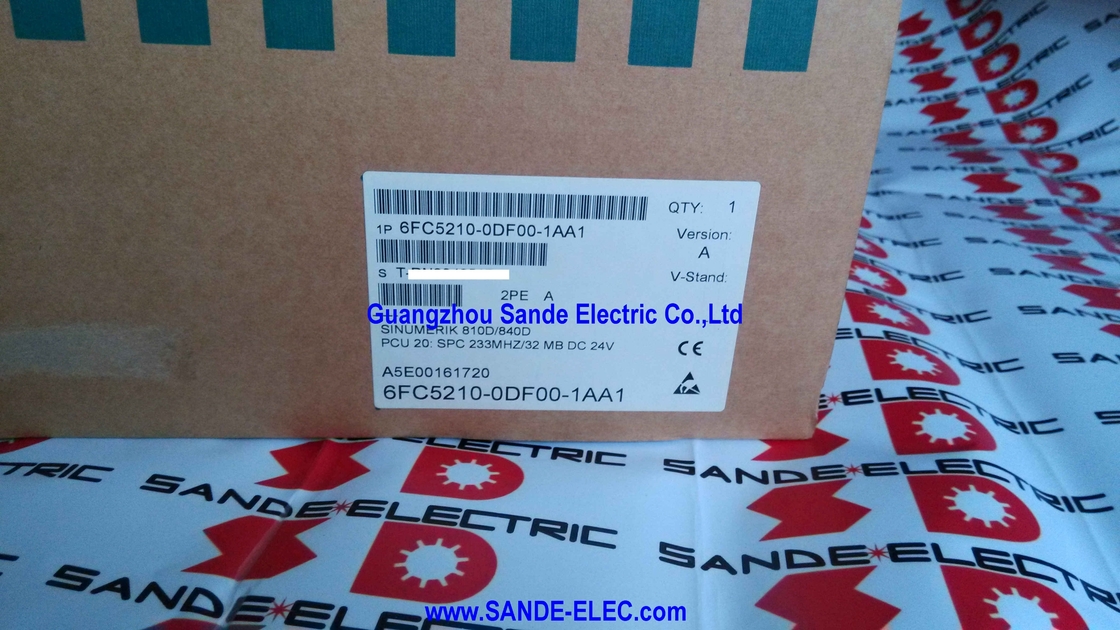
Siemens 6FC5210-0DF00-1AA1 | SINUMERIK 810D/840D PCU 20 — SPC 233MHz / 32MB DRAM / 16MB Flash, 24VDC, HMI Embedded, Up to 6 Interface Languages, CF/PCMCIA Software Update
Position in PCU20 Hardware Generation Sequence:
- 6FC5210-0DF00-0AA0: 166MHz / 16MB DRAM / 8MB Flash
- 6FC5210-0DF00-0AA1: 166MHz / 32MB DRAM / 16MB Flash
- 6FC5210-0DF00-1AA0: 233MHz / 32MB DRAM / 8MB Flash
- 6FC5210-0DF00-1AA1: 233MHz / 32MB DRAM / 16MB Flash (this unit)
- 6FC5210-0DF00-0AA2: 266MHz / 32MB DRAM / 16MB Flash
- 6FC5210-0DF00-1AA2: 333MHz / 32MB DRAM / 16MB Flash
- 6FC5210-0DF00-1AA3: 500MHz / 32MB DRAM / 16MB Flash
The PCU 20 in the SINUMERIK 840D/810D System Architecture
To understand what the Siemens 6FC5210-0DF00-1AA1 actually does, it helps to see where it sits in the SINUMERIK 840D system.
The 840D architecture splits CNC functions between two physically separate units — the NCU (Numerical Control Unit) and the PCU (Panel Control Unit):
The NCU (housed in its own box, typically in the machine's drive cabinet) is the machine's computational core: it runs the NC kernel, executes part programs, interpolates axis trajectories, closes the servo position loops, manages the PROFIBUS fieldbus to drives and I/O modules, and runs the PLC.
The NCU does the real-time machining mathematics.
The PCU is the human-machine interface computer — the unit that runs the Windows-based HMI software, drives the operator panel display, responds to keyboard input, manages the file system (part programs, tool data, machine parameters), and provides the SINDNC network and RS-232 communication to external PCs and DNC systems.
The PCU connects to the NCU via the MPI/PROFIBUS link and to the operator panel front via a separate connector.
The PCU 20 specifically is the compact, Flash-based implementation of this concept: no rotating hard disk, operating system and HMI software stored in onboard Flash memory, running on a single-board SPC (Siemens PC) processor.
The PCU 20 runs HMI Embedded — a streamlined HMI software environment optimised for Flash storage that provides the complete SINUMERIK operator interface (part program editing, machine operation, tool management, parameter access, diagnostics, simulation) in a reduced-footprint implementation compared to the HMI Advanced software running on the larger PCU 50 with its hard disk.
The 6FC5210-0DF00-1AA1's role on a running machine is to present the operator with all the information they need to run the machine — live axis positions, spindle speed, feed rate, active program block, alarm messages, tool data — and to accept all the inputs that change how the machine operates. When the PCU 20 fails, the machine is blind and uncontrollable regardless of whether the NCU itself is functioning perfectly.
Key Specifications
| Parameter |
Value |
| Processor |
SPC 233 MHz |
| DRAM |
32 MB |
| Flash Memory |
16 MB |
| Supply Voltage |
24V DC |
| HMI Software |
HMI Embedded (pre-loaded) |
| Languages (16MB Flash) |
Up to 6 simultaneously |
| Software Update |
PCMCIA flash card / CF card + adapter |
| Backup Format |
ABB file (Application Backup) |
| CNC Compatibility |
SINUMERIK 840D, 810D |
16MB Flash vs 8MB Flash — Why the Flash Size Matters Operationally
The 6FC5210-0DF00-1AA1 has 16MB of internal Flash — distinguishing it from the -1AA0 variant (same 233MHz CPU, but only 8MB Flash).
This difference is not purely academic: the Flash size determines how many HMI interface languages can be installed on the PCU 20 simultaneously.
With 8MB Flash, the PCU 20's Flash image can hold two languages — typically English plus one additional language.
The machine operator can switch between these two languages through machine data MD 9003 (FIRST_LANGUAGE), but adding a third language requires reconfiguring the Flash image and reinstalling software.
With 16MB Flash, up to six languages can be included in a single software image.
The standard language set covers English, German, French, Italian, Spanish, and Simplified Chinese — with additional languages available via optional language CDs (6FC5253-6BX10-_XG0).
For machine builders who sell the same machine model into multiple markets, or for factories where operators speak different languages, the 16MB Flash variant is the correct specification because it accommodates multi-language operation without multiple Flash image variants.
The practical maintenance implication: when sourcing a replacement PCU 20, confirm whether the machine's existing ABB backup file was generated from a 16MB or 8MB Flash unit.
A 16MB Flash image cannot be loaded onto an 8MB Flash PCU 20, but an 8MB image can be loaded onto a 16MB Flash unit — the 16MB variant is therefore the more flexible replacement option if the exact Flash variant is not confirmed.
Software Backup, Restore, and Update — ABB File and the CF Card Procedure
The 6FC5210-0DF00-1AA1 stores its entire operating software — the OS environment, HMI Embedded application, machine-specific configuration (alarm texts, display machine data, cycle compilations, OEM customisations), and language files — as a Flash image in the 16MB Flash.
This image can be exported as an ABB (Application Backup) file and imported onto a replacement unit, carrying the complete machine-specific software configuration from one PCU 20 to another.
Creating an ABB backup: With the PCU 20 running, the software installation tool (executed from CD on a connected PC via serial cable, or from the PCU 20's own menu by pressing key 6 at startup) creates the ABB file and writes it to a PCMCIA linear flash card or a Compact Flash card (using a CF-to-PCMCIA adapter).
The ABB file name is PCU_20.ABB by convention.
Restoring to a replacement unit: When a PCU 20 fails and a replacement unit is sourced, the ABB file is loaded from the CF/PCMCIA card to the new unit using the same startup procedure (press key 6 when the serial number appears during boot).
The replacement unit receives the complete software image from the original machine — including all machine-specific customisations — and boots with the identical configuration as the failed unit.
No PC connection is required for the restore process itself.
Software upgrade path: Siemens periodically released updated HMI Embedded software versions for the PCU 20 series (the version numbering follows the HMI Embedded version, e.g., V6.5). Each software release adds functionality, fixes software bugs, and updates the alarm text library.
Software upgrades can be applied to the 6FC5210-0DF00-1AA1 via the same CF card installation procedure, with machine-specific data reapplied after the upgrade as documented in the upgrade instructions.
Identifying PCU 20 Failure on the Machine
When a SINUMERIK 810D/840D machine fails to start or loses its operator interface, distinguishing a PCU 20 failure from an NCU failure or an operator panel fault is essential before ordering replacement hardware. PCU 20 failures typically present in one of several ways:
No display, no boot: The operator panel display remains dark or shows no activity. This could indicate PCU 20 power supply failure, Flash corruption preventing the boot sequence from completing, or hardware failure on the PCU 20 board itself.
Display shows PCU 20 startup but HMI does not load: The PCU 20 boots to the point where the serial number is displayed (the boot menu prompt for key 6) but the HMI software fails to load.
This often indicates Flash memory corruption or an incompatible software image — the Flash image may have been partially corrupted by a power interruption during a previous software update.
HMI loads but NCU communication fails: The HMI interface appears on screen but the display shows alarm messages related to NCU communication loss or MPI link faults.
In this scenario, the PCU 20 hardware may be functional but the MPI communication cable between PCU 20 and NCU is damaged, or the NCU itself has failed — the PCU 20 is not the fault source.
Intermittent freeze or reboot: The HMI freezes during operation or restarts spontaneously.
This can indicate PCU 20 processor or memory faults, Flash degradation in older units, or electrical supply instability (the PCU 20 requires stable 24V DC — voltage ripple or transients can cause erratic behaviour).
Service engineers should use the PCU 20's built-in diagnostic outputs (the LED indicators on the PCU 20 board) and the NCU's own diagnostic status to establish which component is at fault before replacing the PCU 20.
PCU 20 vs PCU 50 — Selecting the Right Platform
The PCU 20 and PCU 50 are both valid HMI units for SINUMERIK 810D/840D, but they represent different capability levels:
The PCU 20 (this unit) runs HMI Embedded: Flash-based, no rotating hard disk, lower processor speed (up to 500MHz in the highest variant), designed for standard machine tool operator interface functions.
It cannot run HMI Advanced — the PC-based expanded HMI that adds features like 3D simulation, ShopMill/ShopTurn graphical programming, and open Windows applications alongside the CNC HMI. The PCU 20 also cannot host the Manage MyMachines or additional Siemens option software packages that require HMI Advanced.
The PCU 50 (e.g., 6FC5210-0DF01-0AA0) runs HMI Advanced on a Pentium-class processor with a hard disk, Windows NT/2000/XP, and supports the full range of SINUMERIK software options.
It is larger, more expensive, and requires a properly maintained hard disk — the hard disk is the most common failure point on PCU 50 units in production environments.
For the vast majority of standard machine tool operations, the PCU 20's HMI Embedded provides everything the machine operator and maintenance engineer needs: part program management, tool compensation, machine parameter access, diagnostic displays, and production reporting.
The PCU 50 is appropriate when the machine builder has specified HMI Advanced for graphical programming, 3D simulation, or specific Siemens software packages that do not run on HMI Embedded.
When the original machine specification used a PCU 20, replacement with the same or a compatible PCU 20 variant (using the ABB file from the original) is the correct maintenance strategy.
Upgrading to a PCU 50 to replace a failed PCU 20 is possible in principle but requires different software installation, different physical mounting, and potentially different MPI/operator panel cabling — making it a commissioning task rather than a like-for-like replacement.
FAQ
Q1: The -1AA1 has a 233MHz processor. Is it compatible with higher-revision software versions designed for faster PCU 20 variants like the 333MHz -1AA2?
All PCU 20 hardware variants — from the original 166MHz -0AA0 through to the 500MHz -1AA3 — run the same HMI Embedded software versions (up to and including V6.5).
The processor speed affects how quickly the HMI responds to user input and how fast screen refreshes occur, but it does not limit software version compatibility.
A 6FC5210-0DF00-1AA1 at 233MHz can run the same HMI Embedded V6.5 software as the 333MHz -1AA2 variant — the performance difference is observable in UI responsiveness but does not affect functional compatibility.
The 16MB Flash capacity determines language count, not the processor speed.
Q2: When replacing a failed PCU 20 with a 6FC5210-0DF00-1AA1, does the NCU need to be reconfigured?
No. The NCU stores its own configuration independently — the NC machine data, drive parameters, PLC program, and axis configurations reside on the NCU, not on the PCU 20. Replacing the PCU 20 does not affect the NCU's stored configuration.
What must be restored on the new PCU 20 is the HMI-side data: alarm texts in the correct language, display machine data (MD 9000-series parameters that control HMI behaviour), OEM screen customisations, and the language installation.
If an ABB backup file was created from the original PCU 20, loading it onto the replacement unit restores all of this in a single operation.
Q3: The PCU 20 has no hard disk. Where are part programs and tool data stored on a machine using this unit?
The PCU 20's own Flash stores the operating software and HMI configuration but is not intended for regular part program storage during production.
Part programs are typically stored in the NCU's own SRAM-backed memory (accessible via the PCU 20's program manager), on a PCMCIA or CF card inserted into the PCU 20, on a network drive via the PCU 20's Ethernet connection (NetworkManager), or transferred via RS-232 DNC to an external DNC server.
Large part program libraries that exceed the NCU's onboard memory are most commonly managed via network connection. Tool data is stored in the NCU's machine data and tool management tables, not on the PCU 20.
Q4: The 6FC5210-0DF00-1AA1 is discontinued. What are the options for maintaining machines that still use it?
Three practical options exist for maintaining 810D/840D machines with PCU 20 units.
First, sourcing tested-good 6FC5210-0DF00-1AA1 units (or compatible higher-revision variants such as the -0AA2 or -1AA2) from the industrial electronics surplus market — this is the dominant approach and stock remains available from specialist CNC spares suppliers.
Second, PCU 20 board-level repair by specialist CNC repair companies, which can restore flash memory, replace failed processor components, or repair power supply sections. Third, platform migration to a SINUMERIK 840D sl or 828D (Siemens' current product line), which involves comprehensive recommissioning and is typically treated as a machine retrofit project rather than a maintenance repair.
Q5: Can the 6FC5210-0DF00-1AA1 be used interchangeably with the -0AA1 (166MHz/16MB Flash) or the -0AA2 (266MHz/16MB Flash)?
All three variants — -0AA1, -1AA1, and -0AA2 — have the same 16MB Flash capacity and 32MB DRAM, making them compatible with the same 16MB ABB backup images and the same language configurations.
An ABB file generated from one variant can be loaded onto any other 16MB Flash variant.
The physical PCU 20 form factor and connector pinout are the same across all PCU 20 hardware versions, allowing physical interchangeability in the operator panel assembly.
The practical difference is processor speed (166/233/266MHz), which affects HMI response time but not functional compatibility.
The -1AA1 (233MHz/16MB) is generally preferable as a replacement for a failed -0AA1 (166MHz/16MB) because it provides faster UI performance with identical software compatibility.



 Your message must be between 20-3,000 characters!